> ## Documentation Index
> Fetch the complete documentation index at: https://photocli.com/llms.txt
> Use this file to discover all available pages before exploring further.
# Features Explained: What photo-cli Does and How
> A walkthrough of the five things photo-cli is built to do — archive, copy, list/open, export to CSV, and map your photos — each shown end to end with a real command, before/after folders, and what happens behind the scenes.
## On this page
1. [Archive into an indexed folder backed by SQLite](#1-archive-into-an-indexed-folder-backed-by-sqlite)
2. [Copy into a new organized folder](#2-copy-into-a-new-organized-folder)
3. [List or open photos by their metadata](#3-list-or-open-photos-by-their-metadata)
4. [Query your photo archive with AI assistants over MCP](#4-query-your-photo-archive-with-ai-assistants-over-mcp)
5. [Export every photo's metadata to a CSV report](#5-export-every-photo-metadata-to-a-csv-report)
6. [Navigate your photo locations on Google Maps & Earth](#6-navigate-your-photo-locations-on-google-maps-earth)
## The test photo set
Every example on this page uses the same starting folder — 18 photos and 1 companion file across two subfolders, plus 2 photos at the root:
```text theme={null}
├── DSC_5727.jpg
├── GOPR6742.jpg
├── Italy album
│ ├── DJI_01732.jpg
│ ├── DJI_01733.jpg
│ ├── DSC00001.JPG
│ ├── DSC03467.jpg
│ ├── DSC_1769.JPG
│ ├── DSC_1770.JPG
│ ├── DSC_1770_(same).jpg
│ ├── DSC_1771.JPG
│ ├── GOPR7496.jpg
│ ├── GOPR7497.jpg
│ ├── IMG_0747.JPG
│ ├── IMG_1979.HEIC
│ ├── IMG_1979.mov
│ ├── IMG_1979.xmp
│ ├── IMG_2371.jpg
│ └── IMG_O1979.aae
└── Spain Journey
├── DSC_1807.jpg
├── DSC_1808.jpg
└── IMG_5397.jpg
2 directories, 21 files
```
A few things to note about this set: `DSC_1770.JPG` and `DSC_1770_(same).jpg` are byte-for-byte duplicates, `Italy album/IMG_2371.jpg` has a taken date but no GPS, `Spain Journey/IMG_5397.jpg` has neither, and `IMG_1979.mov` / `IMG_1979.xmp` / `IMG_O1979.aae` are [companion files](/configuration/companion-files) for the `IMG_1979.HEIC` Live Photo.
## 1. Archive into an indexed folder backed by SQLite
The `archive` command is built for long-term, incremental storage. It always lays photos out as `[year]/[month]/[day]/`, embeds a SHA1 hash in every file name to prevent duplicates, records every photo (and the albums it belongs to) in a local SQLite database, and — when asked — deletes the source files after verifying every copy. See the [archive command reference](/commands/archive) for every supported argument.
### Run the command
```bash Long form theme={null}
photo-cli archive \
--input /path/to/source \
--output /path/to/archive \
--album-type DateRange \
--album-name My-Album \
--auto-reverse-geocode-album \
--expected-day-range 7300 \
--delete-on-source \
--reverse-geocode OpenStreetMapFoundation \
--openstreetmap-properties country city
```
```bash Short form theme={null}
photo-cli archive -i /path/to/source -o /path/to/archive \
-y 2 -a My-Album -s -w 7300 -f -e 2 -r country city
```
### Before and after
**Before** — the [test photo set](#the-test-photo-set) above.
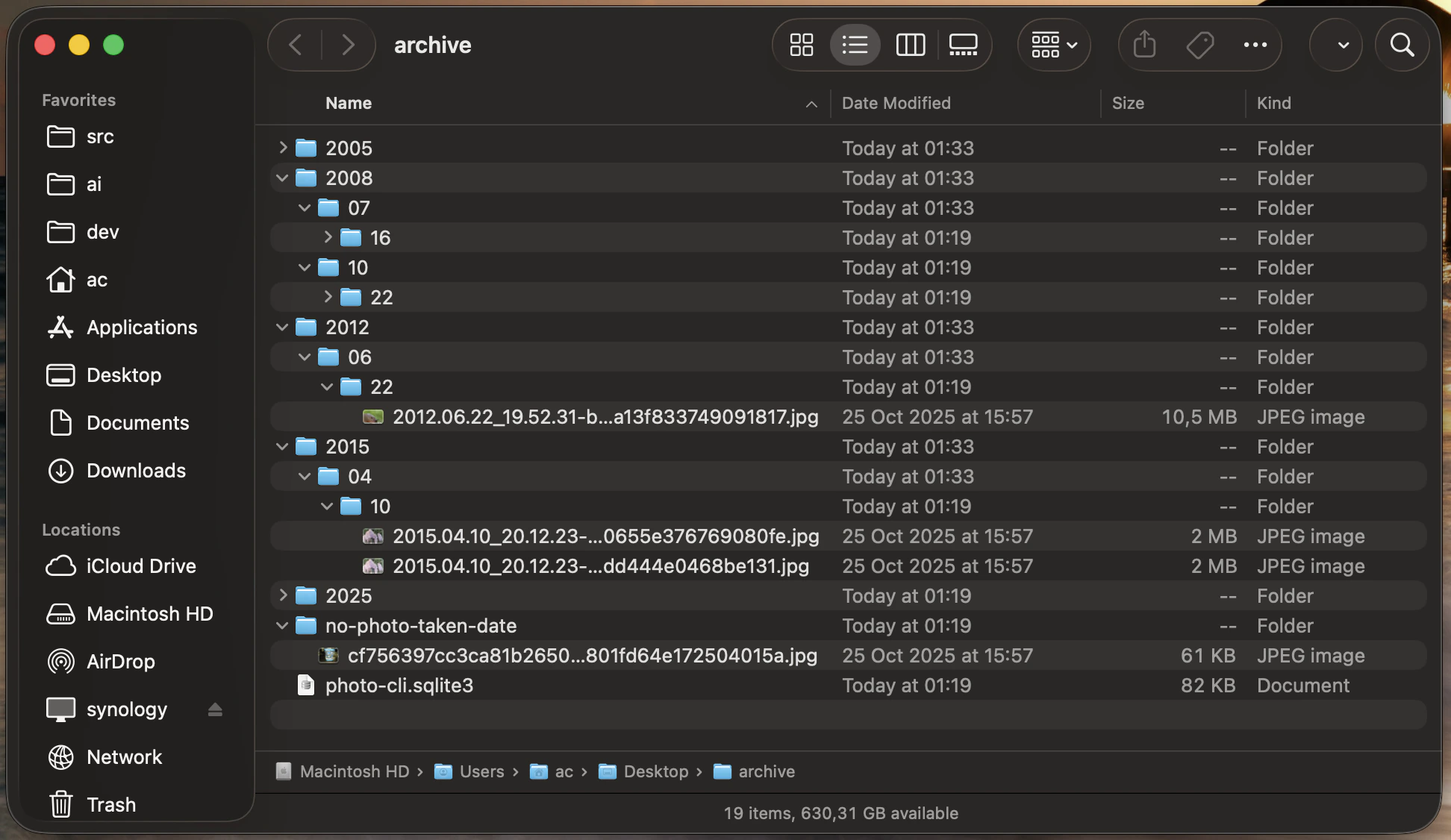
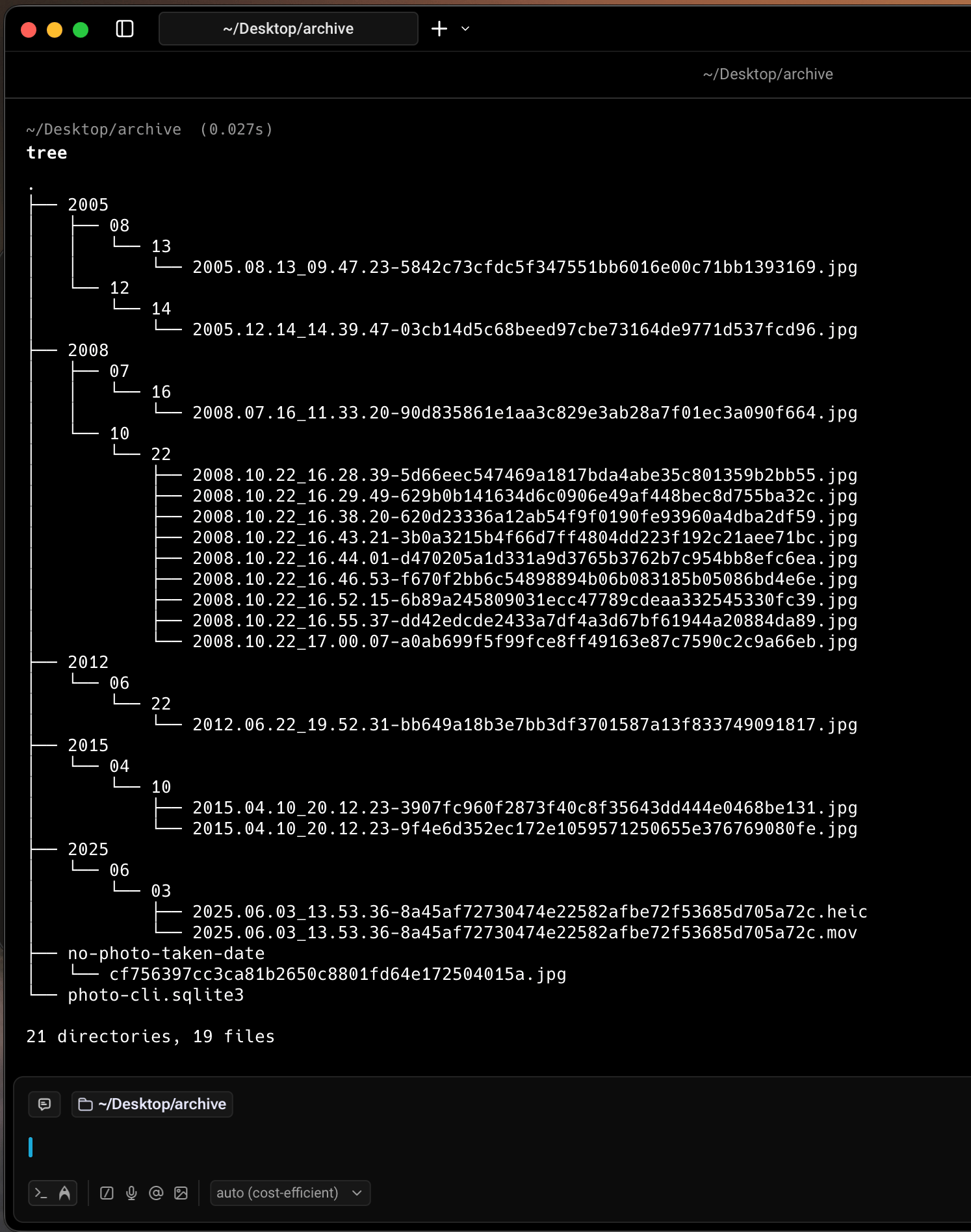
**After**
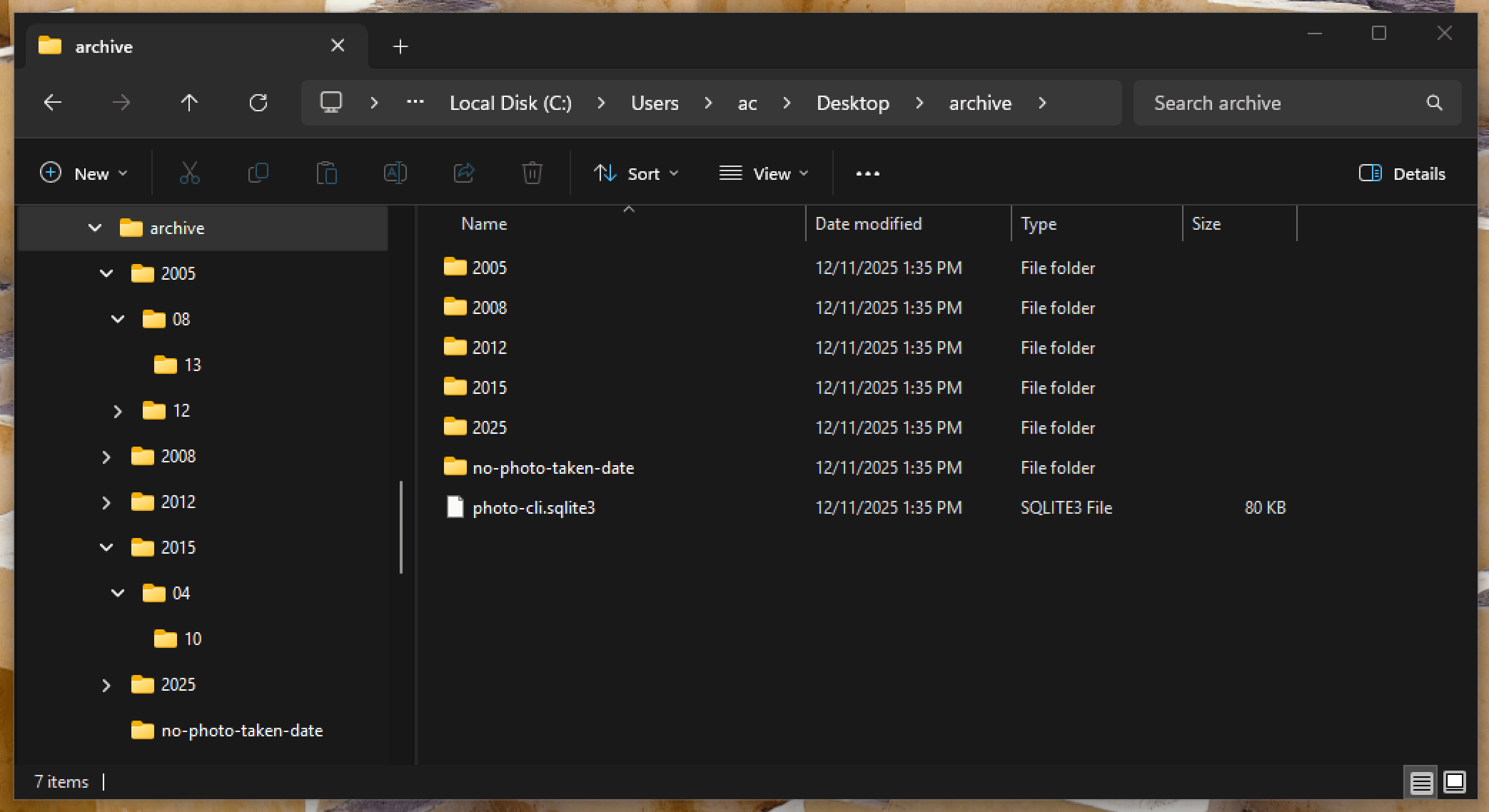
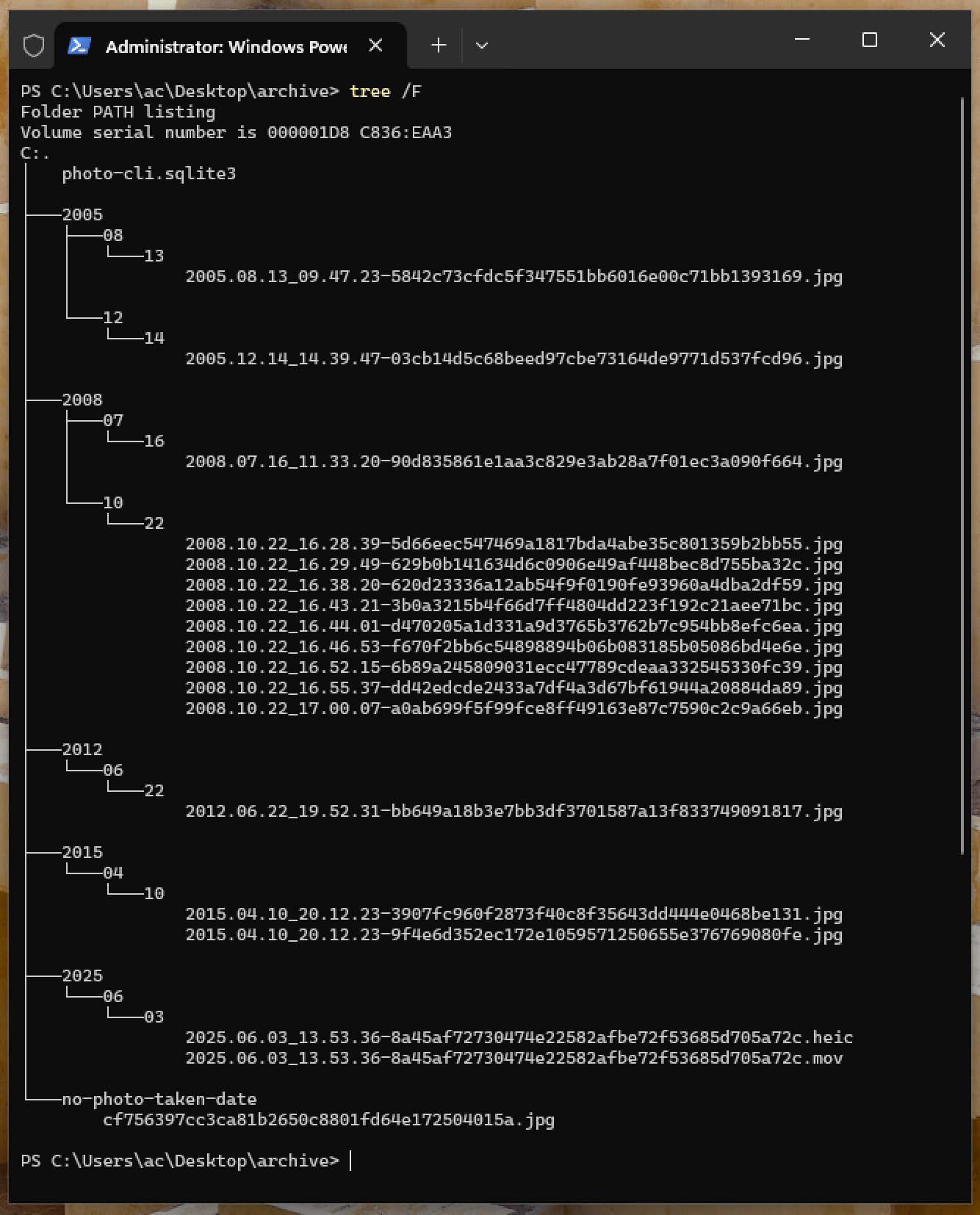
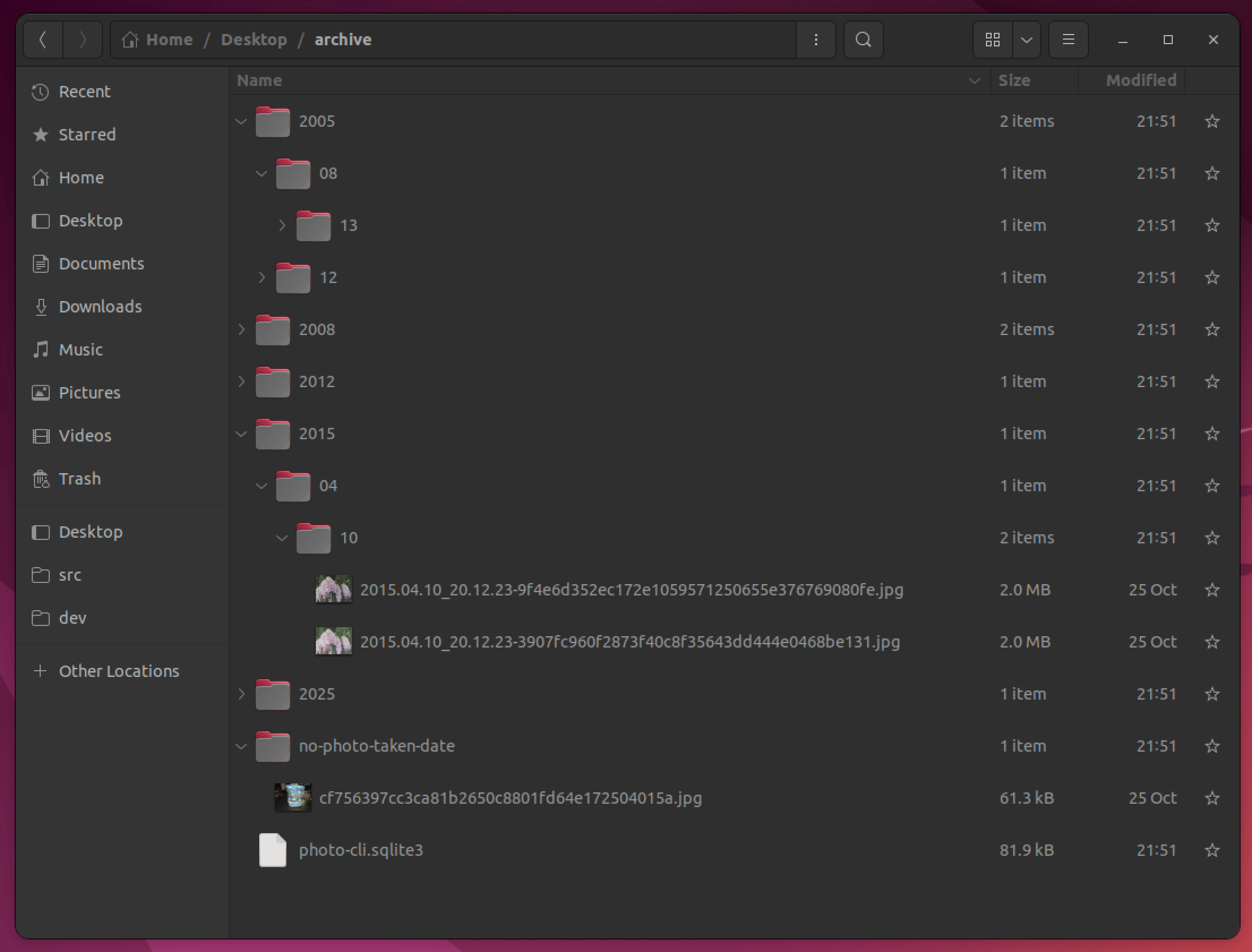
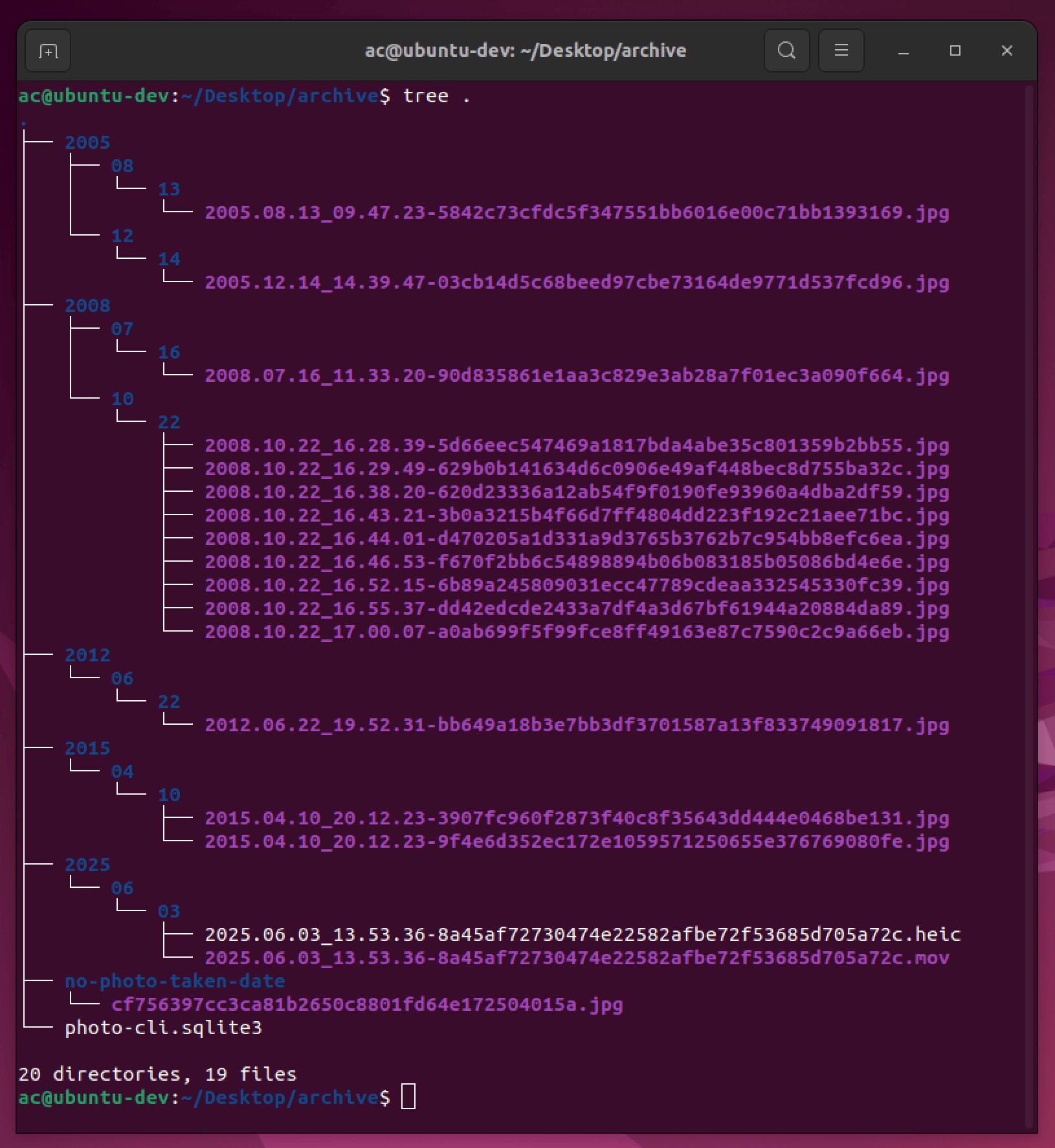
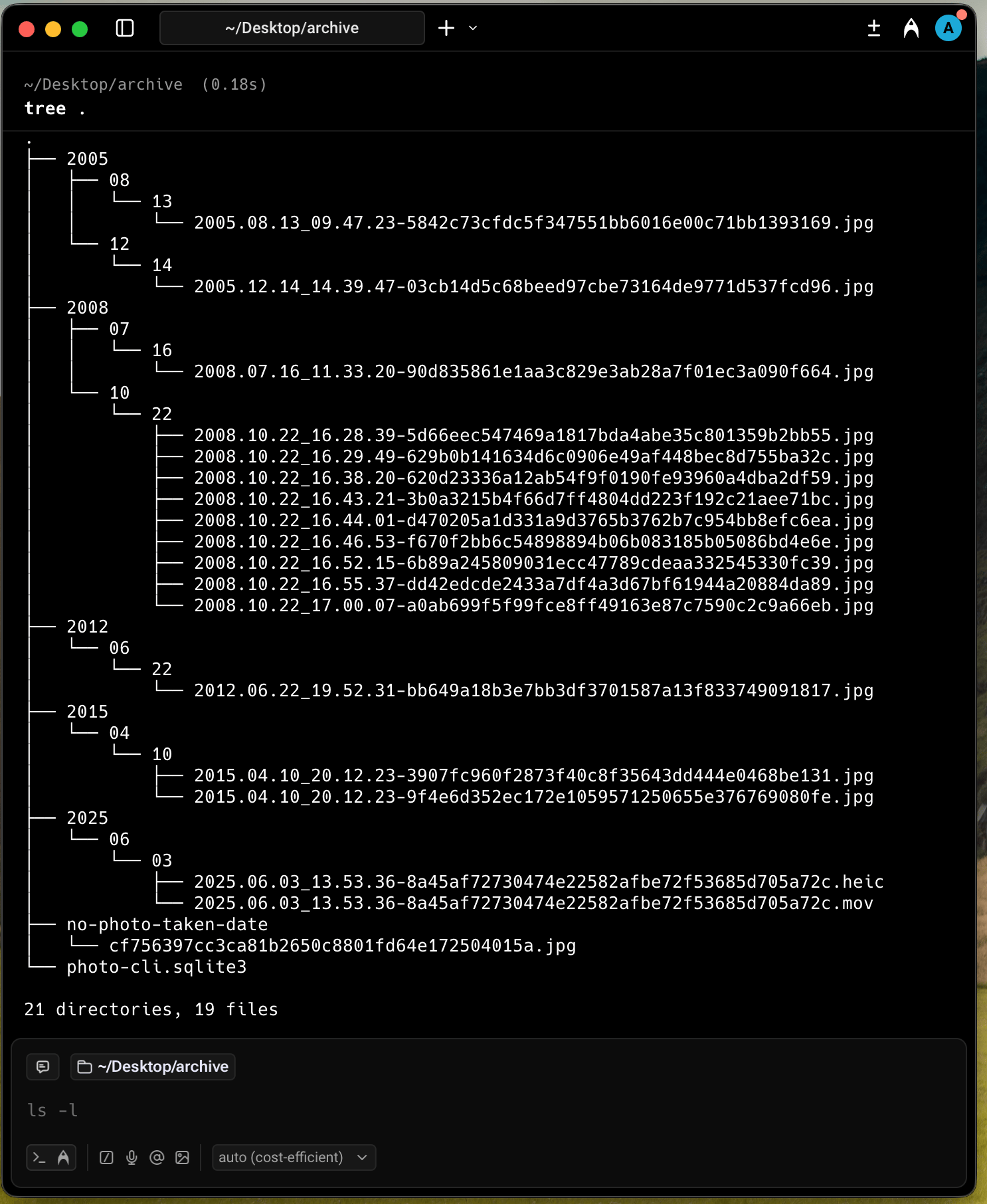
```text theme={null}
├── 2005
│ ├── 08
│ │ └── 13
│ │ └── 2005.08.13_09.47.23-5842c73cfdc5f347551bb6016e00c71bb1393169.jpg
│ └── 12
│ └── 14
│ └── 2005.12.14_14.39.47-03cb14d5c68beed97cbe73164de9771d537fcd96.jpg
├── 2008
│ ├── 07
│ │ └── 16
│ │ └── 2008.07.16_11.33.20-90d835861e1aa3c829e3ab28a7f01ec3a090f664.jpg
│ └── 10
│ └── 22
│ ├── 2008.10.22_16.28.39-5d66eec547469a1817bda4abe35c801359b2bb55.jpg
│ ├── 2008.10.22_16.29.49-629b0b141634d6c0906e49af448bec8d755ba32c.jpg
│ ├── 2008.10.22_16.38.20-620d23336a12ab54f9f0190fe93960a4dba2df59.jpg
│ ├── 2008.10.22_16.43.21-3b0a3215b4f66d7ff4804dd223f192c21aee71bc.jpg
│ ├── 2008.10.22_16.44.01-d470205a1d331a9d3765b3762b7c954bb8efc6ea.jpg
│ ├── 2008.10.22_16.46.53-f670f2bb6c54898894b06b083185b05086bd4e6e.jpg
│ ├── 2008.10.22_16.52.15-6b89a245809031ecc47789cdeaa332545330fc39.jpg
│ ├── 2008.10.22_16.55.37-dd42edcde2433a7df4a3d67bf61944a20884da89.jpg
│ └── 2008.10.22_17.00.07-a0ab699f5f99fce8ff49163e87c7590c2c9a66eb.jpg
├── 2012
│ └── 06
│ └── 22
│ └── 2012.06.22_19.52.31-bb649a18b3e7bb3df3701587a13f833749091817.jpg
├── 2015
│ └── 04
│ └── 10
│ ├── 2015.04.10_20.12.23-3907fc960f2873f40c8f35643dd444e0468be131.jpg
│ └── 2015.04.10_20.12.23-9f4e6d352ec172e1059571250655e376769080fe.jpg
├── 2025
│ └── 06
│ └── 03
│ ├── 2025.06.03_13.53.36-8a45af72730474e22582afbe72f53685d705a72c.heic
│ └── 2025.06.03_13.53.36-8a45af72730474e22582afbe72f53685d705a72c.mov
├── no-photo-taken-date
│ └── cf756397cc3ca81b2650c8801fd64e172504015a.jpg
└── photo-cli.sqlite3
20 directories, 19 files
```
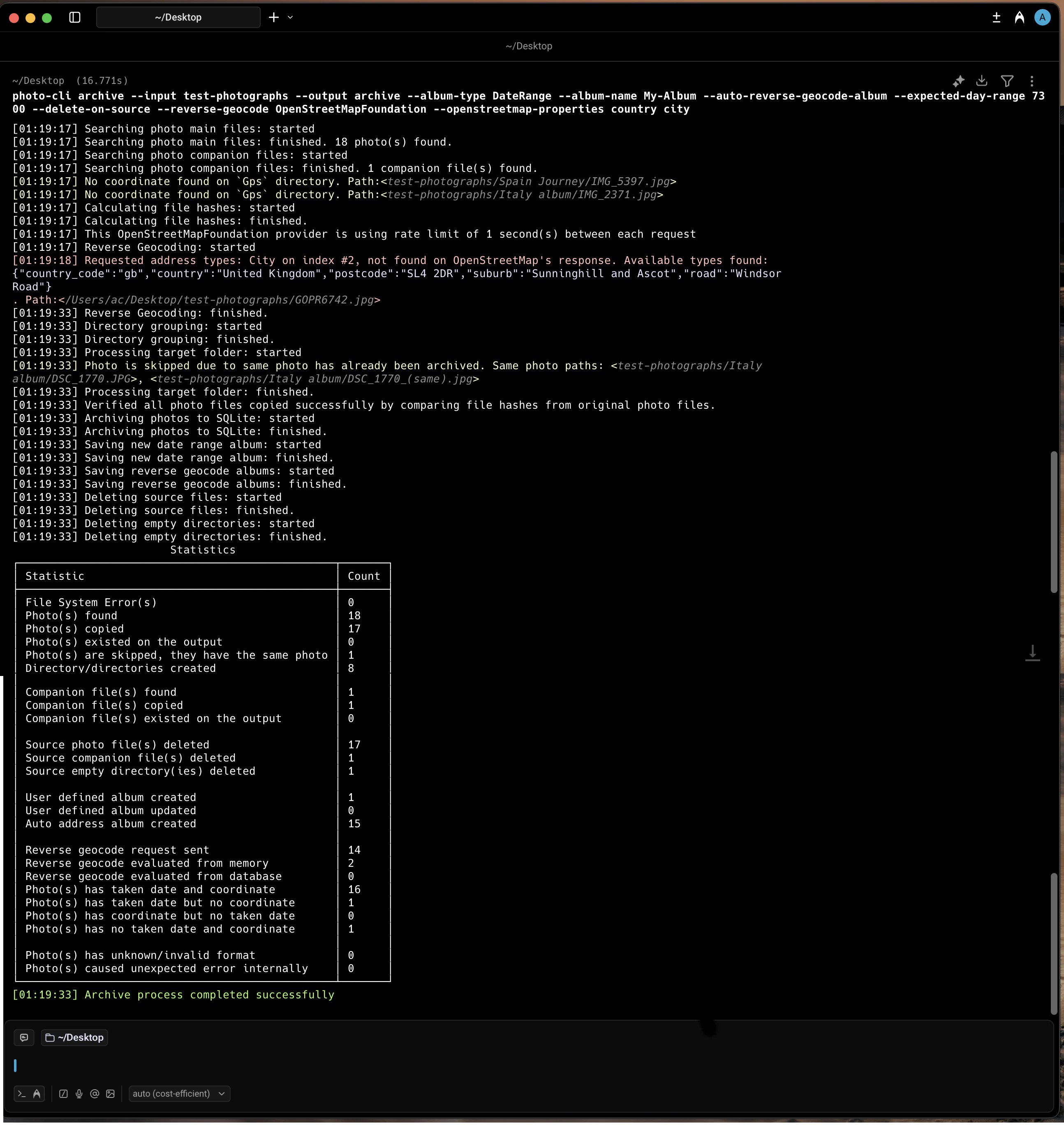
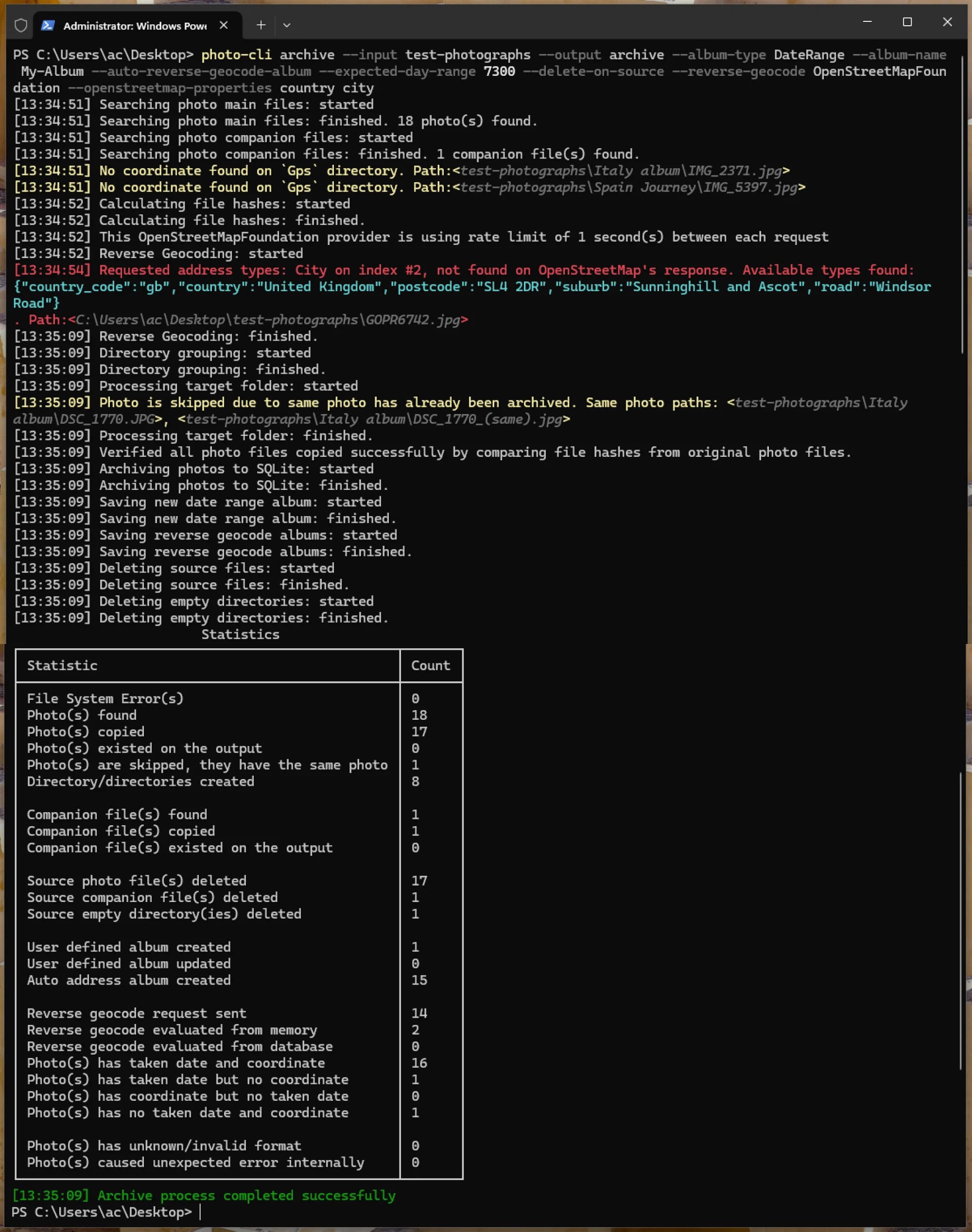
### What happened, step by step
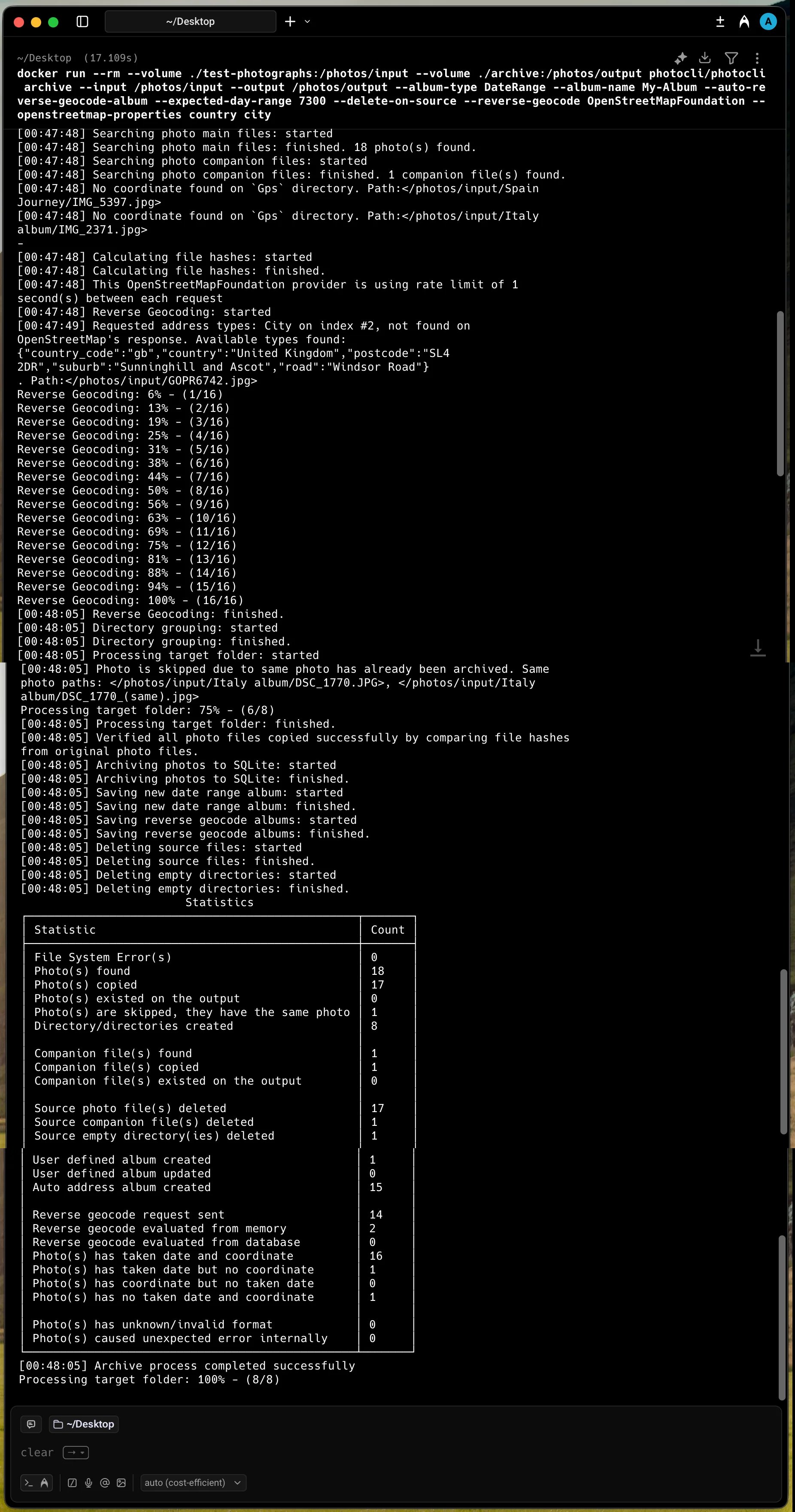
1. **Discovery.** photo-cli walked the source folder and found 18 photos and 1 companion file (`IMG_1979.mov`, the Live Photo clip that travels with `IMG_1979.HEIC`).
2. **EXIF extraction.** For each photo it read the taken date and GPS coordinates.
3. **Reverse geocoding.** Coordinates were sent to [OpenStreetMap](/reverse-geocoding/providers) and an address was built from the requested administrative levels (`country city`). Repeated coordinates were deduplicated in memory so the rate-limited API was only called once per unique location.
4. **Day-range guard.** `--expected-day-range 7300` rejects archives whose photos span more than \~20 years. This is a safety net to catch a mis-pointed source folder before any copy happens.
5. **Year/month/day layout.** Every photo lands in `[year]/[month]/[day]/` derived from its EXIF date — for example `/2008/10/22/`.
6. **SHA1 in the file name.** Files are renamed to `yyyy.MM.dd_HH.mm.ss-{sha1}.ext` (e.g. `2008.07.16_11.33.20-90d835861e1aa3c829e3ab28a7f01ec3a090f664.jpg`). Companion files keep their own extension but share the SHA1 stem of their main photo.
7. **Automatic deduplication.** `DSC_1770.JPG` and `DSC_1770_(same).jpg` hash identically — only one is copied; the other is logged as skipped.
8. **No-date fallback.** `Spain Journey/IMG_5397.jpg` has no taken date, so it goes into `no-photo-taken-date/` and is named with only its SHA1.
9. **Copy verification.** After copying, photo-cli re-hashes every output file and compares it to the source. A disk error during the copy would be surfaced immediately.
10. **SQLite indexing.** All metadata — path, taken date, coordinates, formatted address, individual `Address1..Address8` levels, SHA1 — is written to `photo-cli.sqlite3` at the root of the archive.
11. **Albums.** `--album-name My-Album --album-type DateRange` creates a user-defined date-range album spanning the earliest and latest photo. `--auto-reverse-geocode-album` additionally creates one album per geocoded level (e.g. `Italia`, `Italia-Firenze`, `Venezia`, `United Kingdom`) so you can later open every photo from a country, city, or region without remembering exact dates.
12. **Source cleanup.** `--delete-on-source` removes the source photos, companion files, and now-empty directories — but only after the verification step in step 9 succeeded.
13. **Statistics.** A summary table is printed to the terminal: photos found vs. copied vs. skipped, geocode requests sent vs. served from cache, albums created, and so on.
### Console output
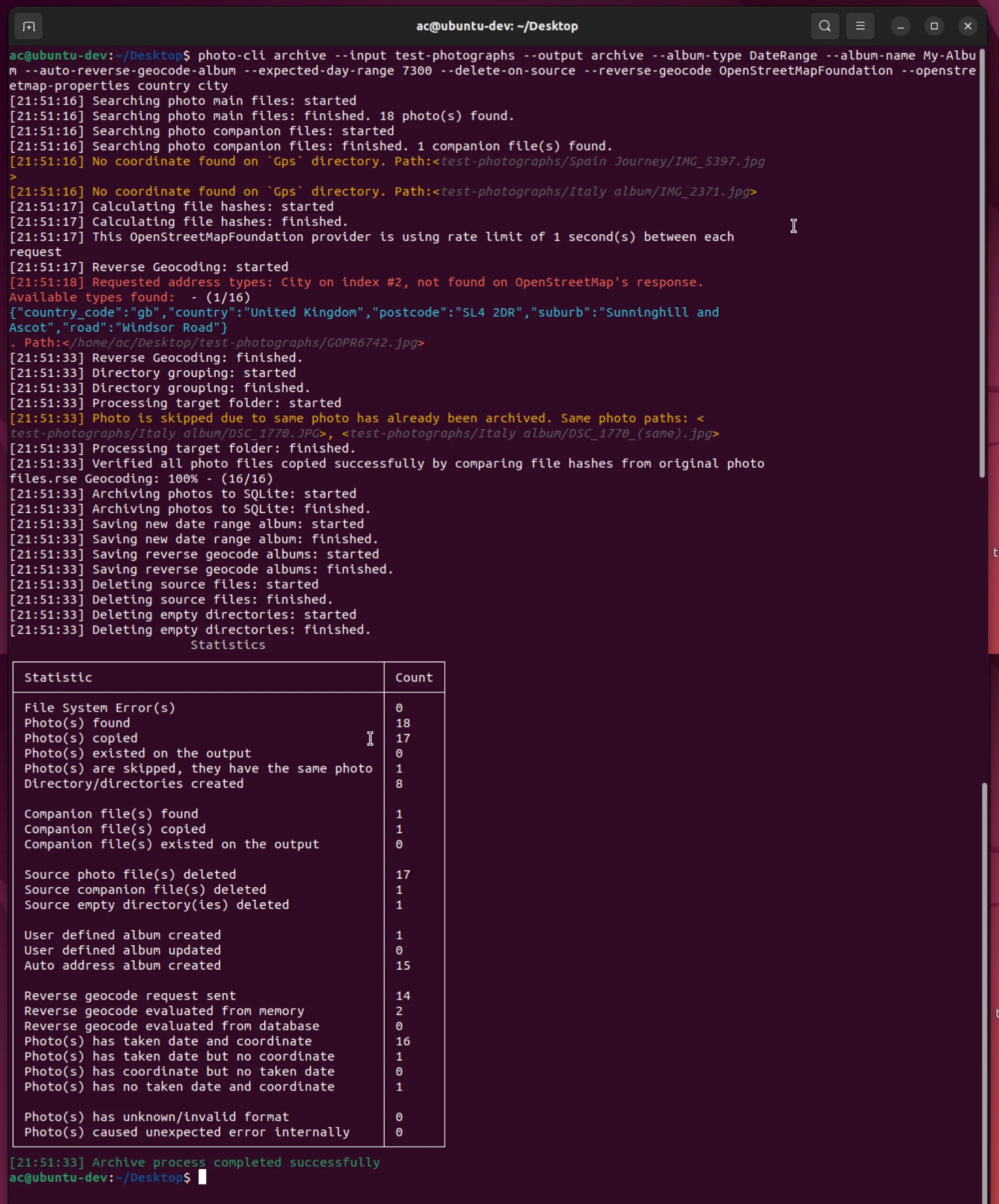
```text theme={null}
[17:07:27] Searching photo main files: started
[17:07:27] Searching photo main files: finished. 18 photo(s) found.
[17:07:27] Searching photo companion files: started
[17:07:27] Searching photo companion files: finished. 1 companion file(s) found.
[17:07:27] No coordinate found on `Gps` directory. Path:
[17:07:27] No coordinate found on `Gps` directory. Path:
[17:07:28] Calculating file hashes: started
[17:07:28] Calculating file hashes: finished.
[17:07:28] This OpenStreetMapFoundation provider is using rate limit of 1 second(s) between each request
[17:07:28] Reverse Geocoding: started
[17:07:31] Requested address types: City on index #2, not found on OpenStreetMap's response. Available types found:
{'country_code':'gb','country':'United Kingdom','postcode':'SL4 2DR','suburb':'Sunninghill and Ascot','road':'Windsor Road'}
. Path:
[17:07:47] Reverse Geocoding: finished.
[17:07:47] Directory grouping: started
[17:07:47] Directory grouping: finished.
[17:07:47] Processing target folder: started
[17:07:47] Photo is skipped due to same photo has already been archived. Same photo paths: , <
/test-photographs/Italy album/DSC_1770_(same).jpg>
[17:07:47] Processing target folder: finished.
[17:07:47] Verified all photo files copied successfully by comparing file hashes from original photo files.
[17:07:47] Archiving photos to SQLite: started
[17:07:47] Archiving photos to SQLite: finished.
[17:07:47] Saving new date range album: started
[17:07:47] Saving new date range album: finished.
[17:07:47] Saving reverse geocode albums: started
[17:07:47] Saving reverse geocode albums: finished.
[17:07:47] Deleting source files: started
[17:07:47] Deleting source files: finished.
[17:07:47] Deleting empty directories: started
[17:07:47] Deleting empty directories: finished.
Statistics
┌────────────────────────────────────────────────┬───────┐
│ Statistic │ Count │
├────────────────────────────────────────────────┼───────┤
│ File System Error(s) │ 0 │
│ Photo(s) found │ 18 │
│ Photo(s) copied │ 17 │
│ Photo(s) existed on the output │ 0 │
│ Photo(s) are skipped, they have the same photo │ 1 │
│ Directory/directories created │ 8 │
│ │ │
│ Companion file(s) found │ 1 │
│ Companion file(s) copied │ 1 │
│ Companion file(s) existed on the output │ 0 │
│ │ │
│ Source photo file(s) deleted │ 17 │
│ Source companion file(s) deleted │ 1 │
│ Source empty directory(ies) deleted │ 1 │
│ │ │
│ User defined album created │ 1 │
│ User defined album updated │ 0 │
│ Auto address album created │ 15 │
│ │ │
│ Reverse geocode request sent │ 14 │
│ Reverse geocode evaluated from memory │ 2 │
│ Reverse geocode evaluated from database │ 0 │
│ Photo(s) has taken date and coordinate │ 16 │
│ Photo(s) has taken date but no coordinate │ 1 │
│ Photo(s) has coordinate but no taken date │ 0 │
│ Photo(s) has no taken date and coordinate │ 1 │
│ │ │
│ Photo(s) has unknown/invalid format │ 0 │
│ Photo(s) caused unexpected error internally │ 0 │
└────────────────────────────────────────────────┴───────┘
[17:07:47] Archive process completed successfully
```
The archive layout is intentionally fixed — `[year]/[month]/[day]/` with SHA1-stamped names — so the same archive folder can be safely re-targeted by future `archive` runs. New photos slot in cleanly, and any duplicate of a previously archived photo is detected and skipped.
### How it looks across platforms
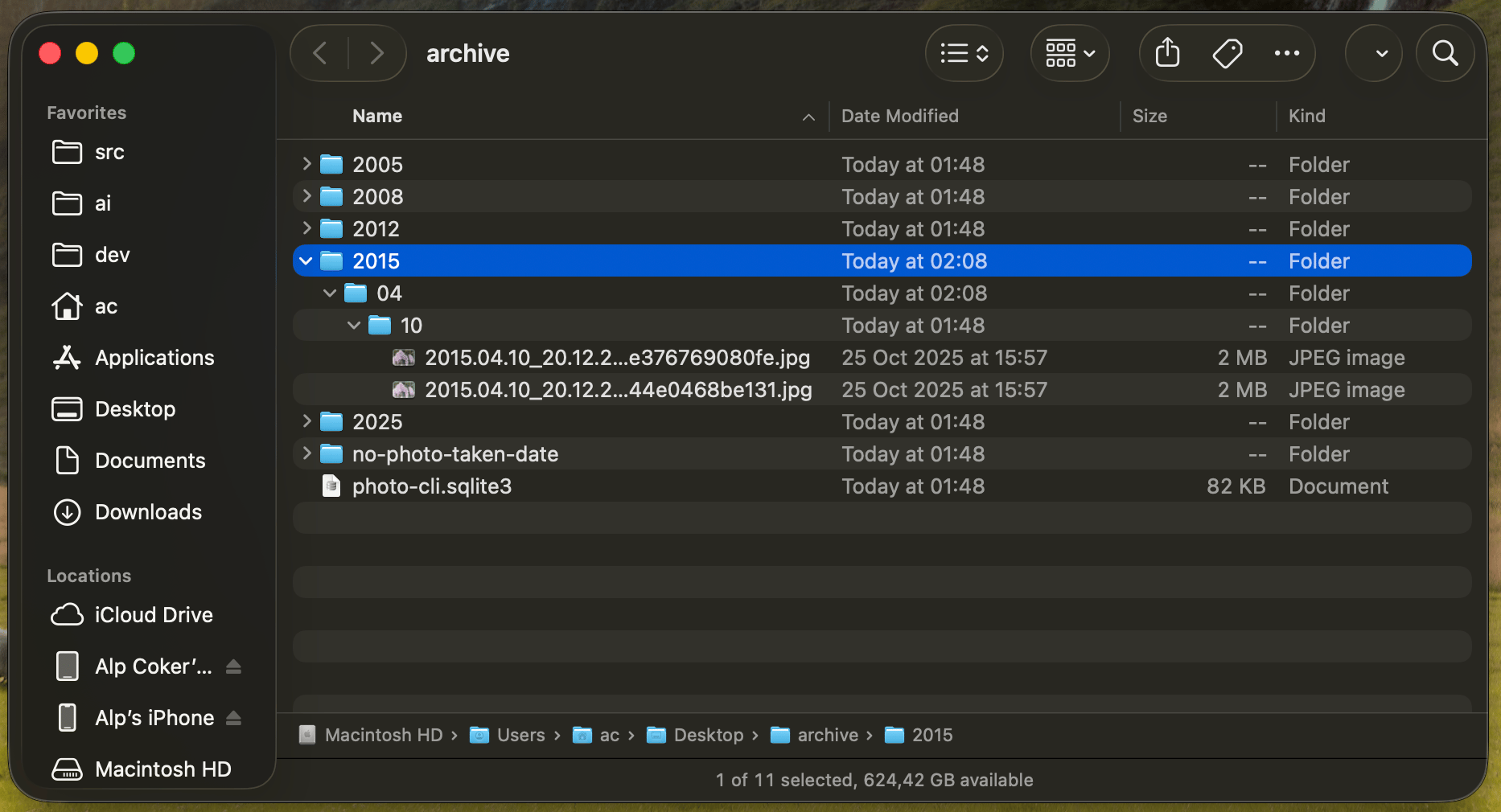
The same `archive` command runs on macOS, Windows, Linux, and inside a container. Each tab shows the terminal executing the command, the resulting folder in the native file manager, and a `tree` listing of the archive.
 ## 2. Copy into a new organized folder
The `copy` command is the flexible one. Unlike `archive`, it is configurable end-to-end: you choose the [folder structure](/commands/copy), the [file naming style](/reference/arguments), whether to flatten or preserve the original hierarchy, what to do with photos missing a date or GPS, and whether to verify the copy. See the [copy command reference](/commands/copy) and the [examples gallery](/examples/overview) for more strategies.
### Run the command
```bash Long form theme={null}
photo-cli copy \
--process-type SubFoldersPreserveFolderHierarchy \
--naming-style DateTimeWithSecondsAddress \
--number-style PaddingZeroCharacter \
--folder-append DayRange \
--folder-append-location Prefix \
--reverse-geocode OpenStreetMapFoundation \
--openstreetmap-properties country city \
--output photo-cli-test \
--no-coordinate InSubFolder \
--no-taken-date InSubFolder \
--verify \
--expected-day-range 7300 \
--missing-reverse-geocode Continue
```
```bash Short form theme={null}
photo-cli copy -f 2 -s 8 -n 2 -a 4 -p 1 -e 2 \
-r country city -o photo-cli-test -c 3 -t 3 -v -w 7300 -z 0
```
### Before and after
**Before** — the [test photo set](#the-test-photo-set) above.
**After** — `photo-cli-test/`:
```text theme={null}
.
├── 2005.08.13_09.47.23-Kenya-Barut ward.jpg
├── 2005.12.14-2025.06.03-Italy album
│ ├── 2005.12.14_14.39.47-Italia-Firenze.jpg
│ ├── 2008.10.22_16.28.39-Italia-Arezzo.jpg
│ ├── 2008.10.22_16.29.49-Italia-Arezzo.jpg
│ ├── 2008.10.22_16.38.20-Italia-Arezzo.jpg
│ ├── 2008.10.22_16.43.21-Italia-Arezzo.jpg
│ ├── 2008.10.22_16.44.01-Italia-Arezzo.jpg
│ ├── 2008.10.22_16.46.53-Italia-Arezzo.jpg
│ ├── 2008.10.22_16.52.15-Italia-Arezzo.jpg
│ ├── 2008.10.22_16.55.37-Italia-Arezzo.jpg
│ ├── 2008.10.22_17.00.07-Italia-Arezzo-1.jpg
│ ├── 2008.10.22_17.00.07-Italia-Arezzo-2.jpg
│ ├── 2025.06.03_13.53.36-Italia-Venezia.heic
│ └── 2025.06.03_13.53.36-Italia-Venezia.mov
├── 2012.06.22_19.52.31-United Kingdom.jpg
├── 2015.04.10-2015.04.10-Spain Journey
│ ├── 2015.04.10_20.12.23-España-Madrid-1.jpg
│ └── 2015.04.10_20.12.23-España-Madrid-2.jpg
├── Italy album
│ └── no-address
│ └── IMG_2371.jpg
├── Spain Journey
│ └── no-address-and-no-photo-taken-date
│ └── IMG_5397.jpg
├── photo-cli-report.csv
└── sha1.lst
6 directories, 21 files
```
### What happened, step by step
1. **`--process-type SubFoldersPreserveFolderHierarchy`** keeps the same folder layout as the source — `Italy album/` stays `Italy album/`, `Spain Journey/` stays `Spain Journey/`.
2. **`--folder-append DayRange --folder-append-location Prefix`** prefixes each subfolder with the earliest and latest photo dates inside it: `Italy album` becomes `2005.12.14-2025.06.03-Italy album`.
3. **`--naming-style DateTimeWithSecondsAddress`** renames every photo with its taken date plus its reverse-geocoded address: `GOPR6742.jpg` becomes `2012.06.22_19.52.31-United Kingdom.jpg`.
4. **`--number-style PaddingZeroCharacter`** appends `-1`, `-2`, … when two photos share the same timestamp-and-address — that is why both Spain photos and both 17:00:07 Italy photos get a numeric suffix.
5. **Reverse geocoding** uses [OpenStreetMap](/reverse-geocoding/providers) with the `country city` levels (see [building your address](/reverse-geocoding/building-address)).
6. **`--no-coordinate InSubFolder` / `--no-taken-date InSubFolder`** keeps photos that are missing data — `IMG_2371.jpg` (no GPS) lands in `Italy album/no-address/`, `IMG_5397.jpg` (no GPS, no date) lands in `Spain Journey/no-address-and-no-photo-taken-date/`.
7. **`--verify`** re-hashes every copied file against its source, then writes the per-file SHA1 list to `sha1.lst` so you can re-verify later with `sha1sum --check sha1.lst`.
8. **`photo-cli-report.csv`** is written into the output folder. It lists every photo's original path, new path, taken date, formatted address, latitude/longitude, and the individual address levels — see the example below.
### Console output
```text theme={null}
[17:07:28] Searching photo main files: started
[17:07:28] Searching photo main files: finished. 18 photo(s) found.
[17:07:28] Searching photo companion files: started
[17:07:28] Searching photo companion files: finished. 1 companion file(s) found.
[17:07:28] No coordinate found on `Gps` directory. Path:<
/Users/ac/src/photo-cli/docs/test-photographs/Spain Journey/IMG_5397.jpg>
[17:07:28] No coordinate found on `Gps` directory. Path:<
/Users/ac/src/photo-cli/docs/test-photographs/Italy album/IMG_2371.jpg>
[17:07:28] This OpenStreetMapFoundation provider is using rate limit of 1
second(s) between each request
[17:07:28] Reverse Geocoding: started
[17:07:29] Requested address types: City on index #2, not found on OpenStreetMap's response. Available types found:
{'country_code':'gb','country':'United Kingdom','postcode':'SL4 2DR','suburb':'Sunninghill and Ascot','road':'Windsor Road'}
. Path:
[17:07:44] Reverse Geocoding: finished.
[17:07:44] Directory grouping: started
[17:07:44] Directory grouping: finished.
[17:07:44] Processing target folder: started
[17:07:45] Processing target folder: finished.
[17:07:45] Verified all photo files copied successfully by comparing file hashes from original photo files.
[17:07:45] All files SHA1 hashes written into file: sha1.lst. You may verify yourself with `sha1sum --check sha1.lst` tool in Linux/macOS.
[17:07:45] Writing csv report: started
[17:07:45] Writing csv report: finished.
Statistics
┌────────────────────────────────────────────────┬───────┐
│ Statistic │ Count │
├────────────────────────────────────────────────┼───────┤
│ File System Error(s) │ 0 │
│ Photo(s) found │ 18 │
│ Photo(s) copied │ 18 │
│ Photo(s) existed on the output │ 0 │
│ Photo(s) are skipped, they have the same photo │ 0 │
│ Directory/directories created │ 4 │
│ │ │
│ Companion file(s) found │ 1 │
│ Companion file(s) copied │ 1 │
│ Companion file(s) existed on the output │ 0 │
│ │ │
│ Source photo file(s) deleted │ 0 │
│ Source companion file(s) deleted │ 0 │
│ Source empty directory(ies) deleted │ 0 │
│ │ │
│ User defined album created │ 0 │
│ User defined album updated │ 0 │
│ Auto address album created │ 0 │
│ │ │
│ Reverse geocode request sent │ 14 │
│ Reverse geocode evaluated from memory │ 2 │
│ Reverse geocode evaluated from database │ 0 │
│ Photo(s) has taken date and coordinate │ 16 │
│ Photo(s) has taken date but no coordinate │ 1 │
│ Photo(s) has coordinate but no taken date │ 0 │
│ Photo(s) has no taken date and coordinate │ 1 │
│ │ │
│ Photo(s) has unknown/invalid format │ 0 │
│ Photo(s) caused unexpected error internally │ 0 │
└────────────────────────────────────────────────┴───────┘
[17:07:45] Copy process completed successfully
```
The `copy` command never touches the source folder, even with `--verify`. If you also want the source removed, that is what the `archive` command's `--delete-on-source` is for.
## 3. List or open photos by their metadata
Once you have an archive (from feature 1), the `list` command can query the SQLite database to find or open photos by date, location, or album. See the [list command reference](/commands/list) for every filter.
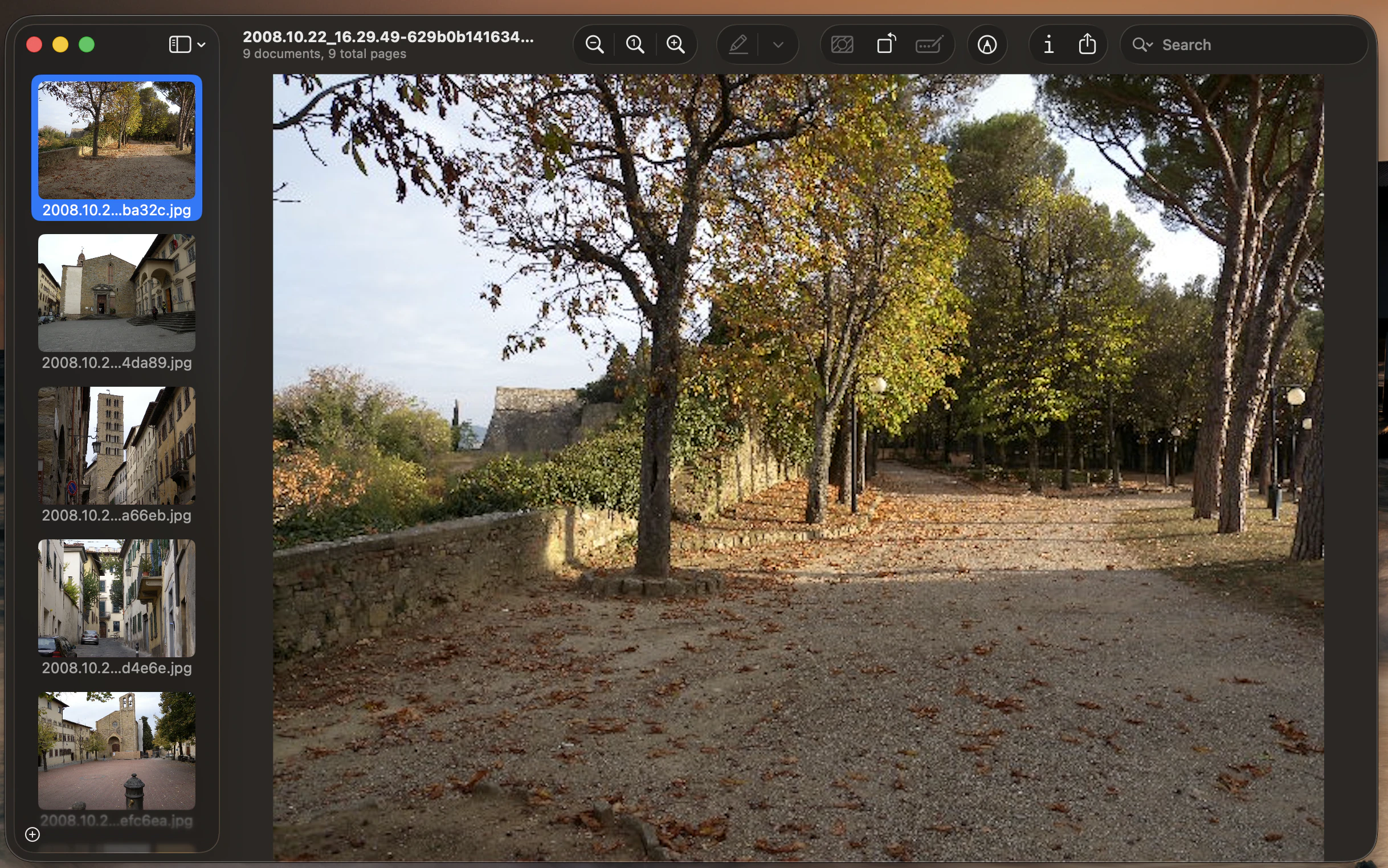
### Open every photo from October 2008
```bash Long form theme={null}
photo-cli list \
--input /path/to/archive \
--type PhotosByDate \
--year 2008 \
--month 10
```
```bash Short form theme={null}
photo-cli list -i /path/to/archive -t 3 -y 2008 -m 10
```
On macOS this opens the matching photos directly in Preview:
## 2. Copy into a new organized folder
The `copy` command is the flexible one. Unlike `archive`, it is configurable end-to-end: you choose the [folder structure](/commands/copy), the [file naming style](/reference/arguments), whether to flatten or preserve the original hierarchy, what to do with photos missing a date or GPS, and whether to verify the copy. See the [copy command reference](/commands/copy) and the [examples gallery](/examples/overview) for more strategies.
### Run the command
```bash Long form theme={null}
photo-cli copy \
--process-type SubFoldersPreserveFolderHierarchy \
--naming-style DateTimeWithSecondsAddress \
--number-style PaddingZeroCharacter \
--folder-append DayRange \
--folder-append-location Prefix \
--reverse-geocode OpenStreetMapFoundation \
--openstreetmap-properties country city \
--output photo-cli-test \
--no-coordinate InSubFolder \
--no-taken-date InSubFolder \
--verify \
--expected-day-range 7300 \
--missing-reverse-geocode Continue
```
```bash Short form theme={null}
photo-cli copy -f 2 -s 8 -n 2 -a 4 -p 1 -e 2 \
-r country city -o photo-cli-test -c 3 -t 3 -v -w 7300 -z 0
```
### Before and after
**Before** — the [test photo set](#the-test-photo-set) above.
**After** — `photo-cli-test/`:
```text theme={null}
.
├── 2005.08.13_09.47.23-Kenya-Barut ward.jpg
├── 2005.12.14-2025.06.03-Italy album
│ ├── 2005.12.14_14.39.47-Italia-Firenze.jpg
│ ├── 2008.10.22_16.28.39-Italia-Arezzo.jpg
│ ├── 2008.10.22_16.29.49-Italia-Arezzo.jpg
│ ├── 2008.10.22_16.38.20-Italia-Arezzo.jpg
│ ├── 2008.10.22_16.43.21-Italia-Arezzo.jpg
│ ├── 2008.10.22_16.44.01-Italia-Arezzo.jpg
│ ├── 2008.10.22_16.46.53-Italia-Arezzo.jpg
│ ├── 2008.10.22_16.52.15-Italia-Arezzo.jpg
│ ├── 2008.10.22_16.55.37-Italia-Arezzo.jpg
│ ├── 2008.10.22_17.00.07-Italia-Arezzo-1.jpg
│ ├── 2008.10.22_17.00.07-Italia-Arezzo-2.jpg
│ ├── 2025.06.03_13.53.36-Italia-Venezia.heic
│ └── 2025.06.03_13.53.36-Italia-Venezia.mov
├── 2012.06.22_19.52.31-United Kingdom.jpg
├── 2015.04.10-2015.04.10-Spain Journey
│ ├── 2015.04.10_20.12.23-España-Madrid-1.jpg
│ └── 2015.04.10_20.12.23-España-Madrid-2.jpg
├── Italy album
│ └── no-address
│ └── IMG_2371.jpg
├── Spain Journey
│ └── no-address-and-no-photo-taken-date
│ └── IMG_5397.jpg
├── photo-cli-report.csv
└── sha1.lst
6 directories, 21 files
```
### What happened, step by step
1. **`--process-type SubFoldersPreserveFolderHierarchy`** keeps the same folder layout as the source — `Italy album/` stays `Italy album/`, `Spain Journey/` stays `Spain Journey/`.
2. **`--folder-append DayRange --folder-append-location Prefix`** prefixes each subfolder with the earliest and latest photo dates inside it: `Italy album` becomes `2005.12.14-2025.06.03-Italy album`.
3. **`--naming-style DateTimeWithSecondsAddress`** renames every photo with its taken date plus its reverse-geocoded address: `GOPR6742.jpg` becomes `2012.06.22_19.52.31-United Kingdom.jpg`.
4. **`--number-style PaddingZeroCharacter`** appends `-1`, `-2`, … when two photos share the same timestamp-and-address — that is why both Spain photos and both 17:00:07 Italy photos get a numeric suffix.
5. **Reverse geocoding** uses [OpenStreetMap](/reverse-geocoding/providers) with the `country city` levels (see [building your address](/reverse-geocoding/building-address)).
6. **`--no-coordinate InSubFolder` / `--no-taken-date InSubFolder`** keeps photos that are missing data — `IMG_2371.jpg` (no GPS) lands in `Italy album/no-address/`, `IMG_5397.jpg` (no GPS, no date) lands in `Spain Journey/no-address-and-no-photo-taken-date/`.
7. **`--verify`** re-hashes every copied file against its source, then writes the per-file SHA1 list to `sha1.lst` so you can re-verify later with `sha1sum --check sha1.lst`.
8. **`photo-cli-report.csv`** is written into the output folder. It lists every photo's original path, new path, taken date, formatted address, latitude/longitude, and the individual address levels — see the example below.
### Console output
```text theme={null}
[17:07:28] Searching photo main files: started
[17:07:28] Searching photo main files: finished. 18 photo(s) found.
[17:07:28] Searching photo companion files: started
[17:07:28] Searching photo companion files: finished. 1 companion file(s) found.
[17:07:28] No coordinate found on `Gps` directory. Path:<
/Users/ac/src/photo-cli/docs/test-photographs/Spain Journey/IMG_5397.jpg>
[17:07:28] No coordinate found on `Gps` directory. Path:<
/Users/ac/src/photo-cli/docs/test-photographs/Italy album/IMG_2371.jpg>
[17:07:28] This OpenStreetMapFoundation provider is using rate limit of 1
second(s) between each request
[17:07:28] Reverse Geocoding: started
[17:07:29] Requested address types: City on index #2, not found on OpenStreetMap's response. Available types found:
{'country_code':'gb','country':'United Kingdom','postcode':'SL4 2DR','suburb':'Sunninghill and Ascot','road':'Windsor Road'}
. Path:
[17:07:44] Reverse Geocoding: finished.
[17:07:44] Directory grouping: started
[17:07:44] Directory grouping: finished.
[17:07:44] Processing target folder: started
[17:07:45] Processing target folder: finished.
[17:07:45] Verified all photo files copied successfully by comparing file hashes from original photo files.
[17:07:45] All files SHA1 hashes written into file: sha1.lst. You may verify yourself with `sha1sum --check sha1.lst` tool in Linux/macOS.
[17:07:45] Writing csv report: started
[17:07:45] Writing csv report: finished.
Statistics
┌────────────────────────────────────────────────┬───────┐
│ Statistic │ Count │
├────────────────────────────────────────────────┼───────┤
│ File System Error(s) │ 0 │
│ Photo(s) found │ 18 │
│ Photo(s) copied │ 18 │
│ Photo(s) existed on the output │ 0 │
│ Photo(s) are skipped, they have the same photo │ 0 │
│ Directory/directories created │ 4 │
│ │ │
│ Companion file(s) found │ 1 │
│ Companion file(s) copied │ 1 │
│ Companion file(s) existed on the output │ 0 │
│ │ │
│ Source photo file(s) deleted │ 0 │
│ Source companion file(s) deleted │ 0 │
│ Source empty directory(ies) deleted │ 0 │
│ │ │
│ User defined album created │ 0 │
│ User defined album updated │ 0 │
│ Auto address album created │ 0 │
│ │ │
│ Reverse geocode request sent │ 14 │
│ Reverse geocode evaluated from memory │ 2 │
│ Reverse geocode evaluated from database │ 0 │
│ Photo(s) has taken date and coordinate │ 16 │
│ Photo(s) has taken date but no coordinate │ 1 │
│ Photo(s) has coordinate but no taken date │ 0 │
│ Photo(s) has no taken date and coordinate │ 1 │
│ │ │
│ Photo(s) has unknown/invalid format │ 0 │
│ Photo(s) caused unexpected error internally │ 0 │
└────────────────────────────────────────────────┴───────┘
[17:07:45] Copy process completed successfully
```
The `copy` command never touches the source folder, even with `--verify`. If you also want the source removed, that is what the `archive` command's `--delete-on-source` is for.
## 3. List or open photos by their metadata
Once you have an archive (from feature 1), the `list` command can query the SQLite database to find or open photos by date, location, or album. See the [list command reference](/commands/list) for every filter.
### Open every photo from October 2008
```bash Long form theme={null}
photo-cli list \
--input /path/to/archive \
--type PhotosByDate \
--year 2008 \
--month 10
```
```bash Short form theme={null}
photo-cli list -i /path/to/archive -t 3 -y 2008 -m 10
```
On macOS this opens the matching photos directly in Preview:
 On Linux and Windows the command prints the matching file paths to stdout — pipe them into the viewer of your choice:
```text theme={null}
/[archive]/2008/10/22/2008.10.22_16.28.39-5d66eec547469a1817bda4abe35c801359b2bb55.jpg
/[archive]/2008/10/22/2008.10.22_16.29.49-629b0b141634d6c0906e49af448bec8d755ba32c.jpg
/[archive]/2008/10/22/2008.10.22_16.38.20-620d23336a12ab54f9f0190fe93960a4dba2df59.jpg
/[archive]/2008/10/22/2008.10.22_16.43.21-3b0a3215b4f66d7ff4804dd223f192c21aee71bc.jpg
/[archive]/2008/10/22/2008.10.22_16.44.01-d470205a1d331a9d3765b3762b7c954bb8efc6ea.jpg
/[archive]/2008/10/22/2008.10.22_16.46.53-f670f2bb6c54898894b06b083185b05086bd4e6e.jpg
/[archive]/2008/10/22/2008.10.22_16.52.15-6b89a245809031ecc47789cdeaa332545330fc39.jpg
/[archive]/2008/10/22/2008.10.22_16.55.37-dd42edcde2433a7df4a3d67bf61944a20884da89.jpg
/[archive]/2008/10/22/2008.10.22_17.00.07-a0ab699f5f99fce8ff49163e87c7590c2c9a66eb.jpg
```
### Inspect the albums that were created
If you ran the archive command in feature 1 with `--auto-reverse-geocode-album`, every geocoded level became its own album. List them with:
```bash Long form theme={null}
photo-cli list --input /path/to/archive --type Albums
```
```bash Short form theme={null}
photo-cli list -i /path/to/archive -t 1
```
The output is rendered as a table:
```text theme={null}
┌────┬──────────────────┬────────────────┬─────────────────────┐
│ Id │ Name │ Type │ Created At │
├────┼──────────────────┼────────────────┼─────────────────────┤
│ 1 │ My-Album │ UserDefined │ 2025-07-27 17:07:47 │
│ 2 │ United Kingdom │ ReverseGeocode │ 2025-07-27 17:07:47 │
│ 3 │ Kenya-Barut ward │ ReverseGeocode │ 2025-07-27 17:07:47 │
│ 4 │ España-Madrid │ ReverseGeocode │ 2025-07-27 17:07:47 │
│ 5 │ Italia-Arezzo │ ReverseGeocode │ 2025-07-27 17:07:47 │
│ 6 │ Italia-Venezia │ ReverseGeocode │ 2025-07-27 17:07:47 │
│ 7 │ Italia-Firenze │ ReverseGeocode │ 2025-07-27 17:07:47 │
│ … │ … │ … │ … │
└────┴──────────────────┴────────────────┴─────────────────────┘
```
You can then open every photo from an album by its name or id — `--type PhotosByAlbumName --album-name 'Italia-Firenze'`, for example.
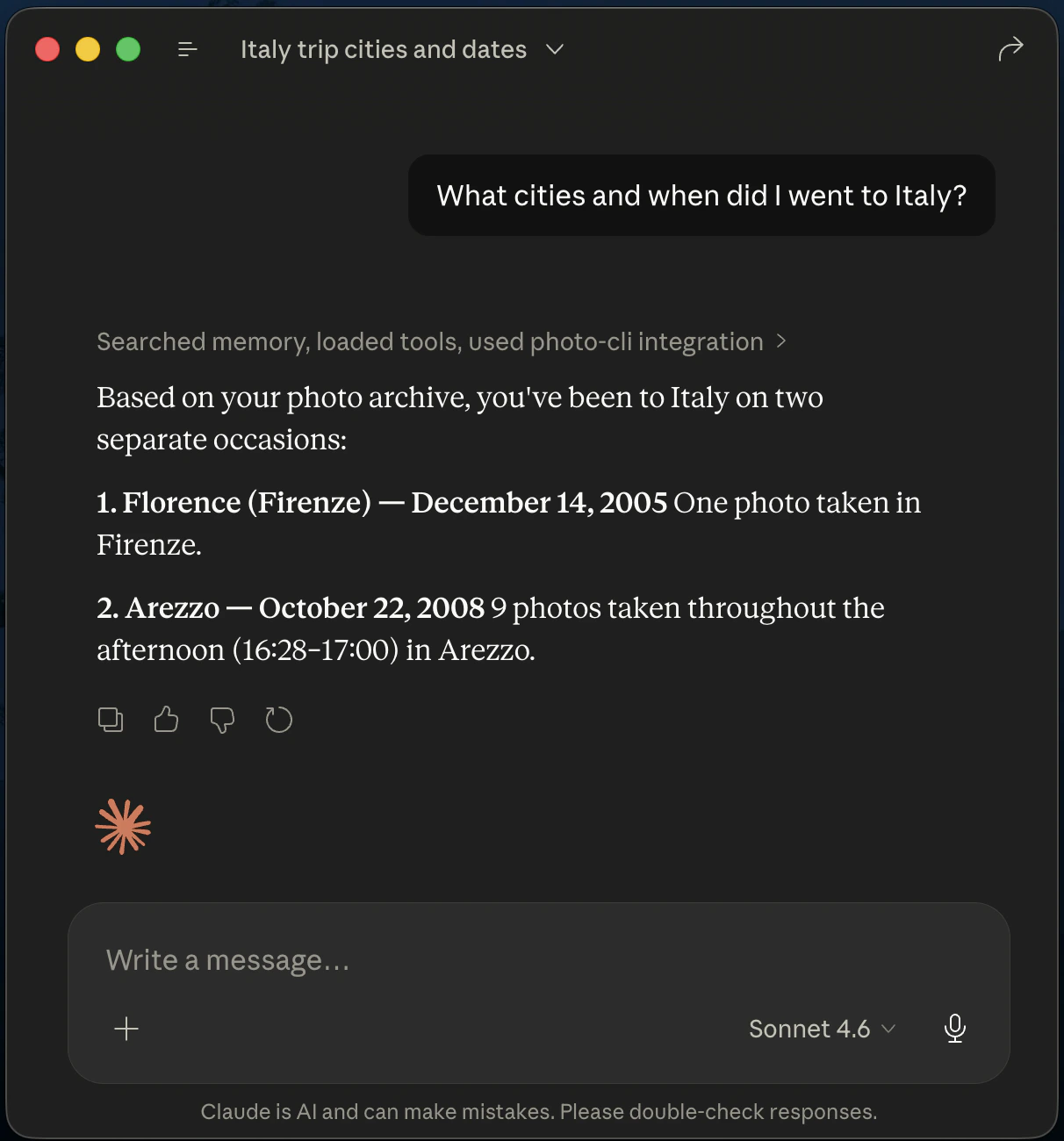
## 4. Query your photo archive with AI assistants over MCP
The `mcp` command starts a [Model Context Protocol](https://modelcontextprotocol.io/) stdio server that exposes your archive's SQLite database to AI assistants. Once connected, tools like Claude Code, Claude Desktop, and VS Code can search by date, location, album, or proximity to a GPS coordinate — and on macOS, open matching photos directly in Preview. See the [mcp command reference](/commands/mcp) for the full tool list and per-client setup.
### Run the command
```bash theme={null}
photo-cli mcp --input /path/to/archive
```
This launches a stdio MCP server pointing at the archive's `photo-cli.sqlite3`. You usually don't run it by hand — your AI client launches it from its MCP config.
### Ask the assistant in plain language
Once connected, ask questions like *"What cities and when did I go to Italy?"*, *"Show me everything taken within 5 km of 43.78, 11.23"*, or *"Open all photos in the Italia-Firenze album"*. The assistant picks the right MCP tool, fills in the parameters, and photo-cli answers from the SQLite index.
On Linux and Windows the command prints the matching file paths to stdout — pipe them into the viewer of your choice:
```text theme={null}
/[archive]/2008/10/22/2008.10.22_16.28.39-5d66eec547469a1817bda4abe35c801359b2bb55.jpg
/[archive]/2008/10/22/2008.10.22_16.29.49-629b0b141634d6c0906e49af448bec8d755ba32c.jpg
/[archive]/2008/10/22/2008.10.22_16.38.20-620d23336a12ab54f9f0190fe93960a4dba2df59.jpg
/[archive]/2008/10/22/2008.10.22_16.43.21-3b0a3215b4f66d7ff4804dd223f192c21aee71bc.jpg
/[archive]/2008/10/22/2008.10.22_16.44.01-d470205a1d331a9d3765b3762b7c954bb8efc6ea.jpg
/[archive]/2008/10/22/2008.10.22_16.46.53-f670f2bb6c54898894b06b083185b05086bd4e6e.jpg
/[archive]/2008/10/22/2008.10.22_16.52.15-6b89a245809031ecc47789cdeaa332545330fc39.jpg
/[archive]/2008/10/22/2008.10.22_16.55.37-dd42edcde2433a7df4a3d67bf61944a20884da89.jpg
/[archive]/2008/10/22/2008.10.22_17.00.07-a0ab699f5f99fce8ff49163e87c7590c2c9a66eb.jpg
```
### Inspect the albums that were created
If you ran the archive command in feature 1 with `--auto-reverse-geocode-album`, every geocoded level became its own album. List them with:
```bash Long form theme={null}
photo-cli list --input /path/to/archive --type Albums
```
```bash Short form theme={null}
photo-cli list -i /path/to/archive -t 1
```
The output is rendered as a table:
```text theme={null}
┌────┬──────────────────┬────────────────┬─────────────────────┐
│ Id │ Name │ Type │ Created At │
├────┼──────────────────┼────────────────┼─────────────────────┤
│ 1 │ My-Album │ UserDefined │ 2025-07-27 17:07:47 │
│ 2 │ United Kingdom │ ReverseGeocode │ 2025-07-27 17:07:47 │
│ 3 │ Kenya-Barut ward │ ReverseGeocode │ 2025-07-27 17:07:47 │
│ 4 │ España-Madrid │ ReverseGeocode │ 2025-07-27 17:07:47 │
│ 5 │ Italia-Arezzo │ ReverseGeocode │ 2025-07-27 17:07:47 │
│ 6 │ Italia-Venezia │ ReverseGeocode │ 2025-07-27 17:07:47 │
│ 7 │ Italia-Firenze │ ReverseGeocode │ 2025-07-27 17:07:47 │
│ … │ … │ … │ … │
└────┴──────────────────┴────────────────┴─────────────────────┘
```
You can then open every photo from an album by its name or id — `--type PhotosByAlbumName --album-name 'Italia-Firenze'`, for example.
## 4. Query your photo archive with AI assistants over MCP
The `mcp` command starts a [Model Context Protocol](https://modelcontextprotocol.io/) stdio server that exposes your archive's SQLite database to AI assistants. Once connected, tools like Claude Code, Claude Desktop, and VS Code can search by date, location, album, or proximity to a GPS coordinate — and on macOS, open matching photos directly in Preview. See the [mcp command reference](/commands/mcp) for the full tool list and per-client setup.
### Run the command
```bash theme={null}
photo-cli mcp --input /path/to/archive
```
This launches a stdio MCP server pointing at the archive's `photo-cli.sqlite3`. You usually don't run it by hand — your AI client launches it from its MCP config.
### Ask the assistant in plain language
Once connected, ask questions like *"What cities and when did I go to Italy?"*, *"Show me everything taken within 5 km of 43.78, 11.23"*, or *"Open all photos in the Italia-Firenze album"*. The assistant picks the right MCP tool, fills in the parameters, and photo-cli answers from the SQLite index.
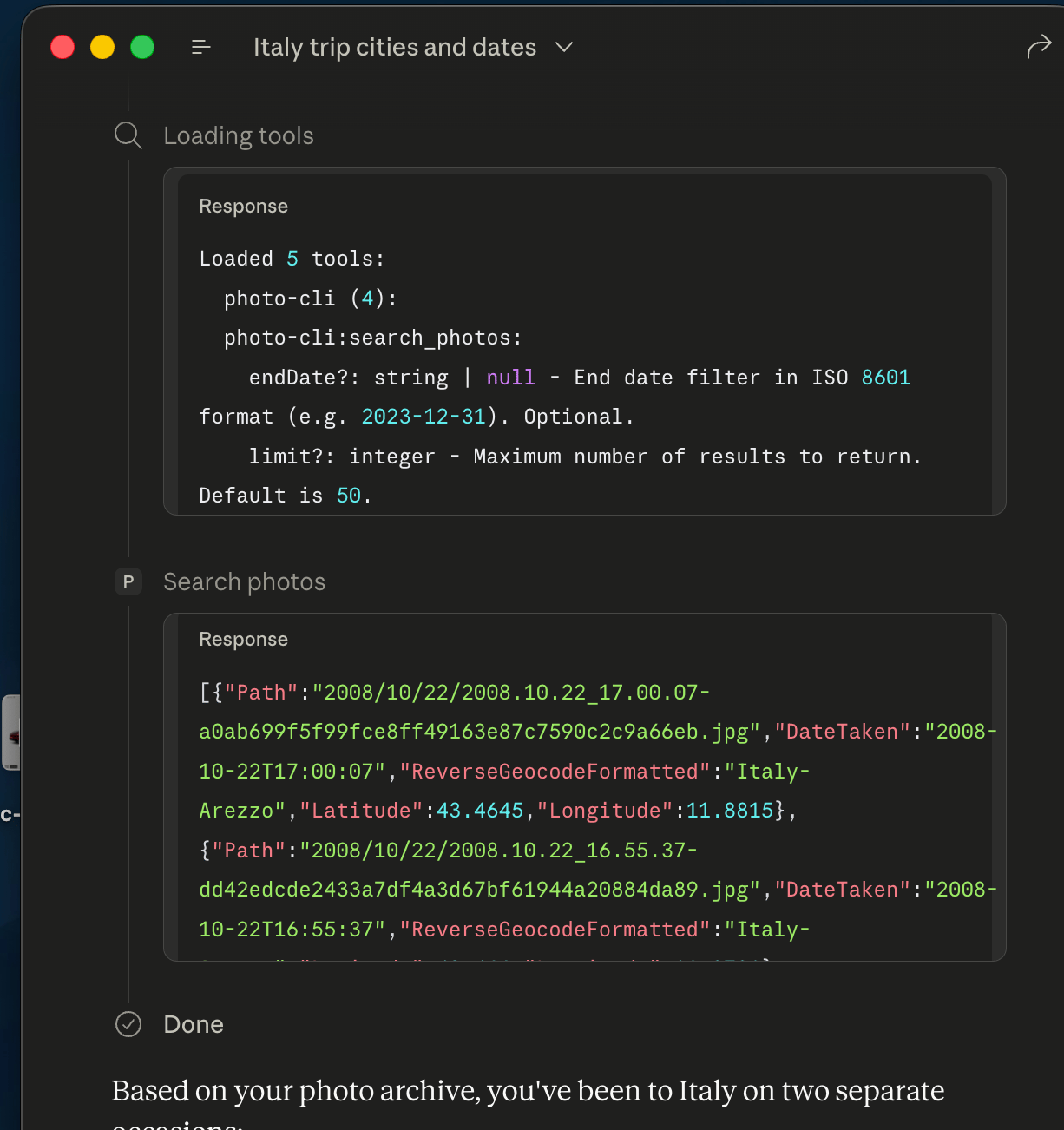
 ### How tools map to the SQLite index
Each exposed MCP tool is a typed query against the archive database — `list_photos_by_date_range`, `find_near_location`, `list_albums`, `open_photos_by_album_name`, and so on. The MCP Inspector view below shows the available tools and their input schemas, which is exactly what the assistant sees when deciding how to answer your question:
### How tools map to the SQLite index
Each exposed MCP tool is a typed query against the archive database — `list_photos_by_date_range`, `find_near_location`, `list_albums`, `open_photos_by_album_name`, and so on. The MCP Inspector view below shows the available tools and their input schemas, which is exactly what the assistant sees when deciding how to answer your question:
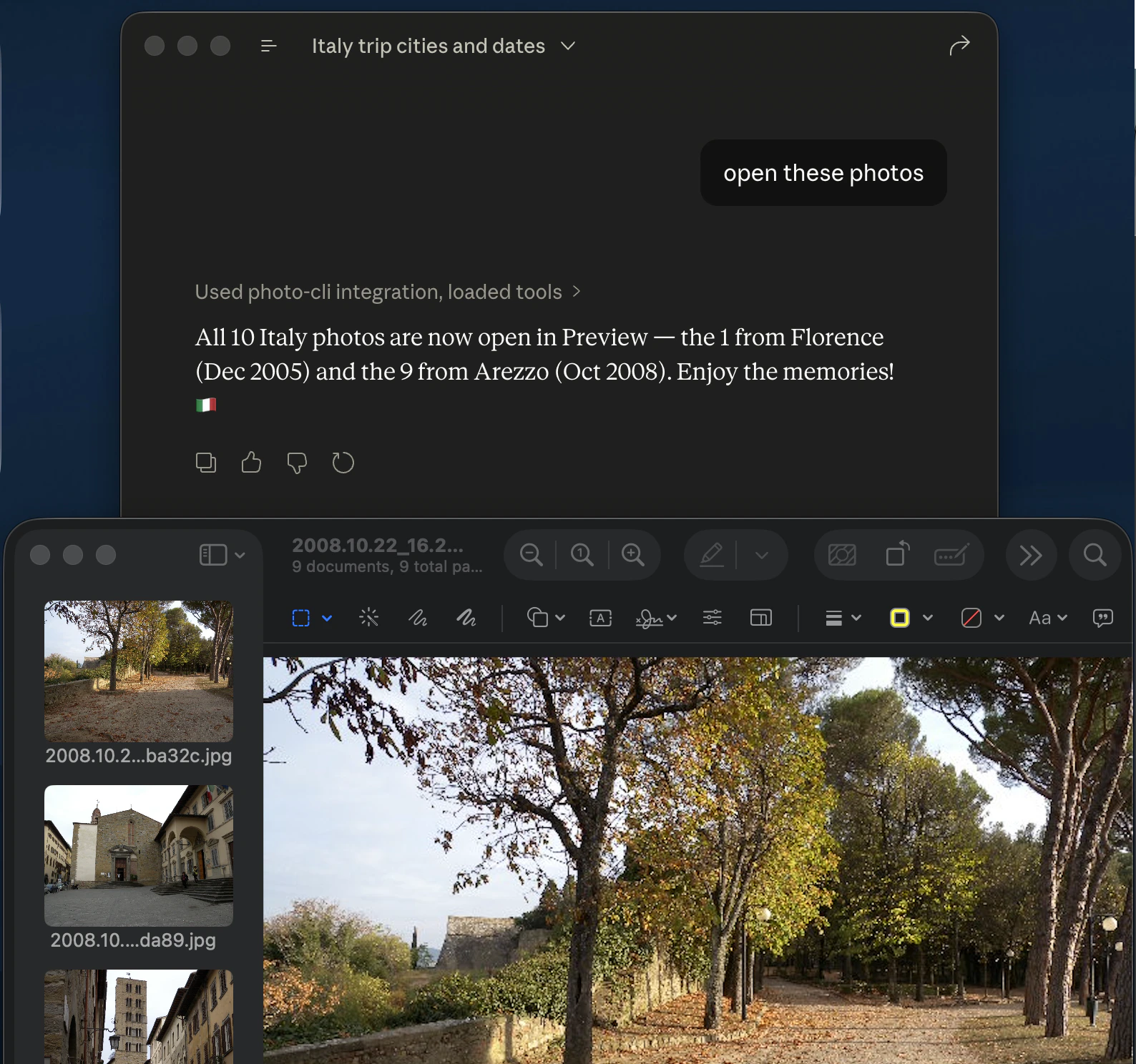
 ### Open the matching photos from the assistant
When you ask the assistant to *open* photos rather than just list them, the MCP server hands the matching files off to your OS image viewer. This is wired up for macOS today — matches open directly in Preview. On Linux and Windows the `open_photos_*` tools are not active yet; use the `list_photos_*` tools and pipe the returned paths to your viewer of choice.
### Open the matching photos from the assistant
When you ask the assistant to *open* photos rather than just list them, the MCP server hands the matching files off to your OS image viewer. This is wired up for macOS today — matches open directly in Preview. On Linux and Windows the `open_photos_*` tools are not active yet; use the `list_photos_*` tools and pipe the returned paths to your viewer of choice.
 ## 5. Export every photo metadata to a CSV report
The `info` command does no copying at all. It scans a folder, extracts the EXIF data, optionally reverse-geocodes, and writes a single CSV report you can open in Excel, Numbers, LibreOffice, or Google Sheets. See the [info command reference](/commands/info).
### Run the command
```bash Long form theme={null}
photo-cli info \
--all-folders \
--output photo-info.csv \
--reverse-geocode OpenStreetMapFoundation \
--openstreetmap-properties country city \
--no-taken-date Continue \
--no-coordinate Continue \
--missing-reverse-geocode Continue
```
```bash Short form theme={null}
photo-cli info -a -o photo-info.csv -e 2 -r country city -t 0 -c 0 -z 0
```
`--no-taken-date Continue` and `--no-coordinate Continue` mean photos missing data still appear in the report — just with empty cells in the affected columns.
### A few rows from the resulting `photo-info.csv`
| PhotoPath | PhotoDateTaken | ReverseGeocodeFormatted | Latitude | Longitude | Address1 | Address2 | Address3 |
| ---------------------------------------- | ------------------- | ------------------------------------------ | -------- | --------- | -------------- | -------- | --------------------- |
| `/TestImages/DSC_5727.jpg` | 08/13/2005 09:47:23 | Kenya | -0.3713 | 36.0564 | Kenya | | |
| `/TestImages/GOPR6742.jpg` | 06/22/2012 19:52:31 | United Kingdom-Ascot-Sunninghill and Ascot | 51.4248 | -0.6736 | United Kingdom | Ascot | Sunninghill and Ascot |
| `/TestImages/Italy album/DSC03467.jpg` | 12/14/2005 14:39:47 | Italia-Firenze-Quartiere 1 | 43.7856 | 11.2346 | Italia | Firenze | Quartiere 1 |
| `/TestImages/Italy album/IMG_2371.jpg` | 07/16/2008 11:33:20 | | | | | | |
| `/TestImages/Spain Journey/DSC_1807.jpg` | 04/10/2015 20:12:23 | España-Madrid | 40.4470 | -3.7248 | España | Madrid | |
| `/TestImages/Spain Journey/IMG_5397.jpg` | | | | | | | |
The full CSV also includes year/month/day/hour/minute/seconds columns and `Address4..Address8` for deeper administrative levels.
### Console output
```text theme={null}
[17:07:33] Searching photo main files: started
[17:07:33] Searching photo main files: finished. 18 photo(s) found.
[17:07:33] No coordinate found on `Gps` directory. Path:
[17:07:33] No coordinate found on `Gps` directory. Path:
[17:07:33] Reverse Geocoding: started
[17:07:33] Requested address types: City on index #2, not found on OpenStreetMap's response. Available types found:
{'country_code':'gb','country':'United Kingdom','postcode':'SL4 2DR','suburb':'Sunninghill and Ascot','road':'Windsor Road'}
. Path:
[17:07:49] Reverse Geocoding: finished.
[17:07:49] Writing csv report: started
[17:07:49] Writing csv report: finished.
Statistics
┌────────────────────────────────────────────────┬───────┐
│ Statistic │ Count │
├────────────────────────────────────────────────┼───────┤
│ File System Error(s) │ 0 │
│ Photo(s) found │ 18 │
│ Photo(s) copied │ 0 │
│ Photo(s) existed on the output │ 0 │
│ Photo(s) are skipped, they have the same photo │ 0 │
│ Directory/directories created │ 0 │
│ │ │
│ Companion file(s) found │ 0 │
│ Companion file(s) copied │ 0 │
│ Companion file(s) existed on the output │ 0 │
│ │ │
│ Source photo file(s) deleted │ 0 │
│ Source companion file(s) deleted │ 0 │
│ Source empty directory(ies) deleted │ 0 │
│ │ │
│ User defined album created │ 0 │
│ User defined album updated │ 0 │
│ Auto address album created │ 0 │
│ │ │
│ Reverse geocode request sent │ 14 │
│ Reverse geocode evaluated from memory │ 2 │
│ Reverse geocode evaluated from database │ 0 │
│ Photo(s) has taken date and coordinate │ 16 │
│ Photo(s) has taken date but no coordinate │ 1 │
│ Photo(s) has coordinate but no taken date │ 0 │
│ Photo(s) has no taken date and coordinate │ 1 │
│ │ │
│ Photo(s) has unknown/invalid format │ 0 │
│ Photo(s) caused unexpected error internally │ 0 │
└────────────────────────────────────────────────┴───────┘
```
## 6. Navigate your photo locations on Google Maps-Earth
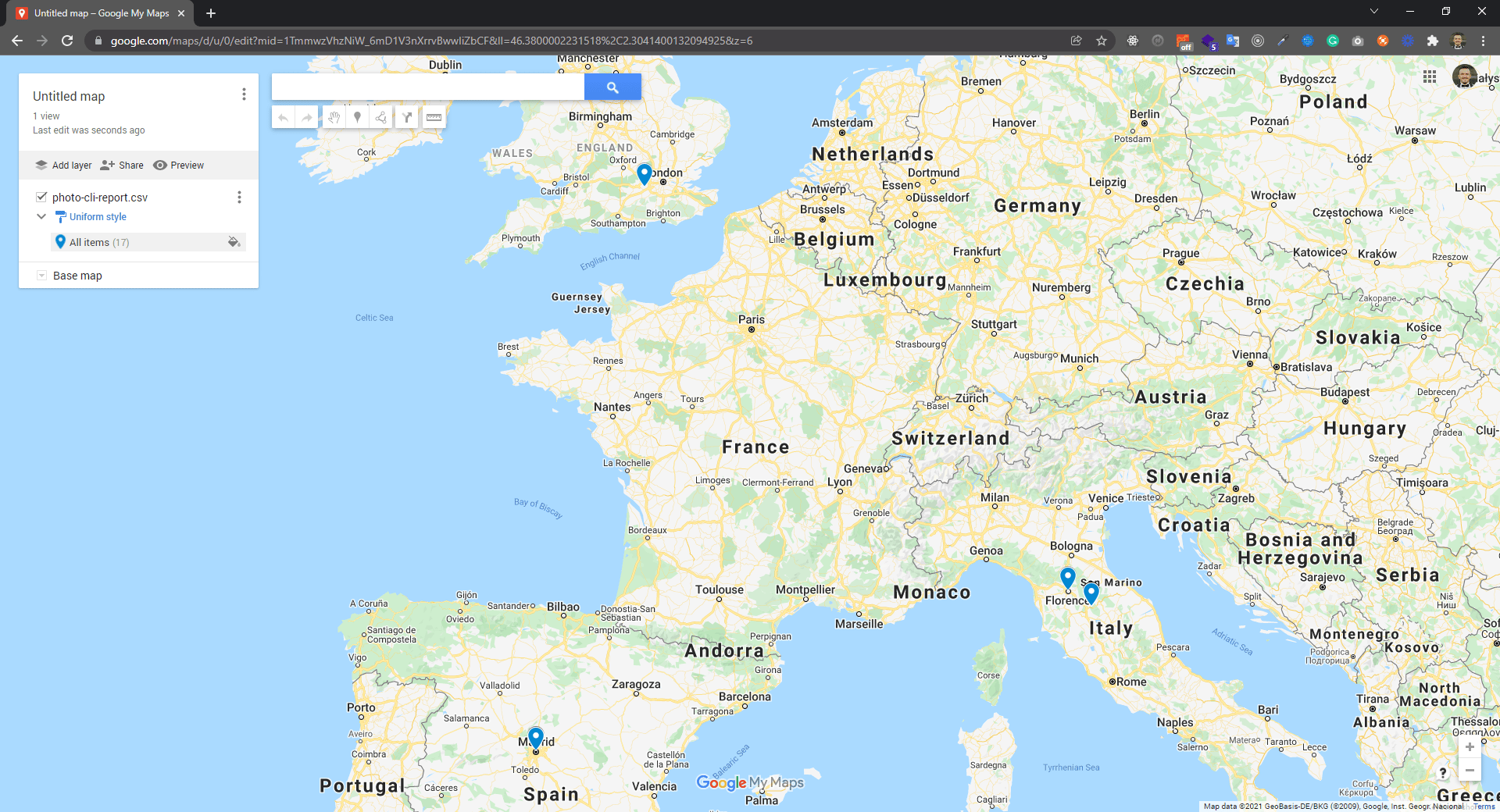
Both the `copy` and `info` commands produce a CSV with a row per photo and lat/long columns. That CSV can be imported directly into Google's mapping tools to navigate your photos on a real map.
### Google My Maps
[Open Google My Maps](https://www.google.com/maps/d) and click **Create a new map**, then import the CSV onto a layer. You get a pin per photo, customizable by label and style.
## 5. Export every photo metadata to a CSV report
The `info` command does no copying at all. It scans a folder, extracts the EXIF data, optionally reverse-geocodes, and writes a single CSV report you can open in Excel, Numbers, LibreOffice, or Google Sheets. See the [info command reference](/commands/info).
### Run the command
```bash Long form theme={null}
photo-cli info \
--all-folders \
--output photo-info.csv \
--reverse-geocode OpenStreetMapFoundation \
--openstreetmap-properties country city \
--no-taken-date Continue \
--no-coordinate Continue \
--missing-reverse-geocode Continue
```
```bash Short form theme={null}
photo-cli info -a -o photo-info.csv -e 2 -r country city -t 0 -c 0 -z 0
```
`--no-taken-date Continue` and `--no-coordinate Continue` mean photos missing data still appear in the report — just with empty cells in the affected columns.
### A few rows from the resulting `photo-info.csv`
| PhotoPath | PhotoDateTaken | ReverseGeocodeFormatted | Latitude | Longitude | Address1 | Address2 | Address3 |
| ---------------------------------------- | ------------------- | ------------------------------------------ | -------- | --------- | -------------- | -------- | --------------------- |
| `/TestImages/DSC_5727.jpg` | 08/13/2005 09:47:23 | Kenya | -0.3713 | 36.0564 | Kenya | | |
| `/TestImages/GOPR6742.jpg` | 06/22/2012 19:52:31 | United Kingdom-Ascot-Sunninghill and Ascot | 51.4248 | -0.6736 | United Kingdom | Ascot | Sunninghill and Ascot |
| `/TestImages/Italy album/DSC03467.jpg` | 12/14/2005 14:39:47 | Italia-Firenze-Quartiere 1 | 43.7856 | 11.2346 | Italia | Firenze | Quartiere 1 |
| `/TestImages/Italy album/IMG_2371.jpg` | 07/16/2008 11:33:20 | | | | | | |
| `/TestImages/Spain Journey/DSC_1807.jpg` | 04/10/2015 20:12:23 | España-Madrid | 40.4470 | -3.7248 | España | Madrid | |
| `/TestImages/Spain Journey/IMG_5397.jpg` | | | | | | | |
The full CSV also includes year/month/day/hour/minute/seconds columns and `Address4..Address8` for deeper administrative levels.
### Console output
```text theme={null}
[17:07:33] Searching photo main files: started
[17:07:33] Searching photo main files: finished. 18 photo(s) found.
[17:07:33] No coordinate found on `Gps` directory. Path:
[17:07:33] No coordinate found on `Gps` directory. Path:
[17:07:33] Reverse Geocoding: started
[17:07:33] Requested address types: City on index #2, not found on OpenStreetMap's response. Available types found:
{'country_code':'gb','country':'United Kingdom','postcode':'SL4 2DR','suburb':'Sunninghill and Ascot','road':'Windsor Road'}
. Path:
[17:07:49] Reverse Geocoding: finished.
[17:07:49] Writing csv report: started
[17:07:49] Writing csv report: finished.
Statistics
┌────────────────────────────────────────────────┬───────┐
│ Statistic │ Count │
├────────────────────────────────────────────────┼───────┤
│ File System Error(s) │ 0 │
│ Photo(s) found │ 18 │
│ Photo(s) copied │ 0 │
│ Photo(s) existed on the output │ 0 │
│ Photo(s) are skipped, they have the same photo │ 0 │
│ Directory/directories created │ 0 │
│ │ │
│ Companion file(s) found │ 0 │
│ Companion file(s) copied │ 0 │
│ Companion file(s) existed on the output │ 0 │
│ │ │
│ Source photo file(s) deleted │ 0 │
│ Source companion file(s) deleted │ 0 │
│ Source empty directory(ies) deleted │ 0 │
│ │ │
│ User defined album created │ 0 │
│ User defined album updated │ 0 │
│ Auto address album created │ 0 │
│ │ │
│ Reverse geocode request sent │ 14 │
│ Reverse geocode evaluated from memory │ 2 │
│ Reverse geocode evaluated from database │ 0 │
│ Photo(s) has taken date and coordinate │ 16 │
│ Photo(s) has taken date but no coordinate │ 1 │
│ Photo(s) has coordinate but no taken date │ 0 │
│ Photo(s) has no taken date and coordinate │ 1 │
│ │ │
│ Photo(s) has unknown/invalid format │ 0 │
│ Photo(s) caused unexpected error internally │ 0 │
└────────────────────────────────────────────────┴───────┘
```
## 6. Navigate your photo locations on Google Maps-Earth
Both the `copy` and `info` commands produce a CSV with a row per photo and lat/long columns. That CSV can be imported directly into Google's mapping tools to navigate your photos on a real map.
### Google My Maps
[Open Google My Maps](https://www.google.com/maps/d) and click **Create a new map**, then import the CSV onto a layer. You get a pin per photo, customizable by label and style.
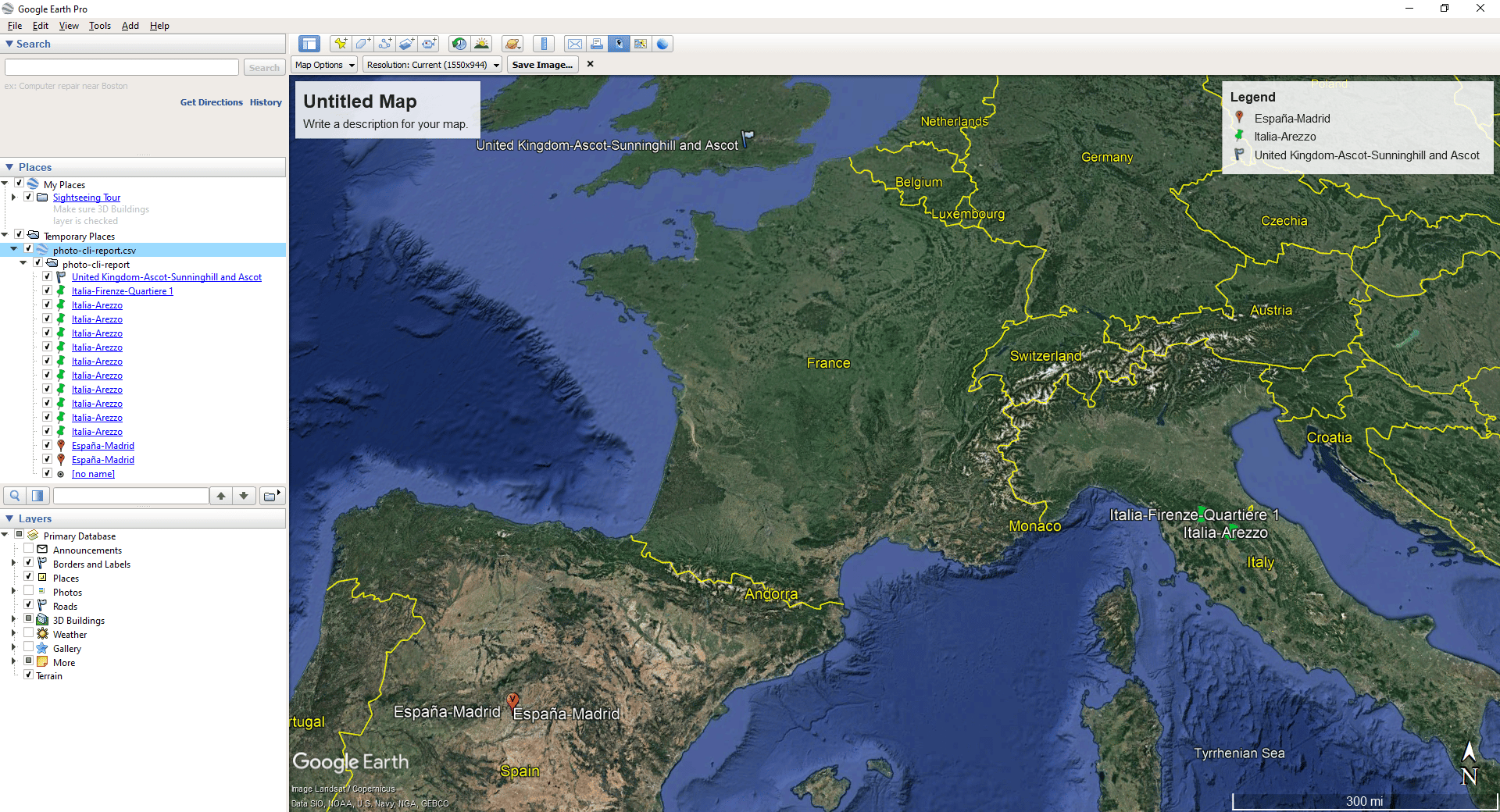
 ### Google Earth Desktop
Install [Google Earth Desktop](https://www.google.com/earth/versions/#earth-pro) and use the **File → Import** menu to load the CSV. Save it as KML/KMZ to share or to use it on the web version.
### Google Earth Desktop
Install [Google Earth Desktop](https://www.google.com/earth/versions/#earth-pro) and use the **File → Import** menu to load the CSV. Save it as KML/KMZ to share or to use it on the web version.
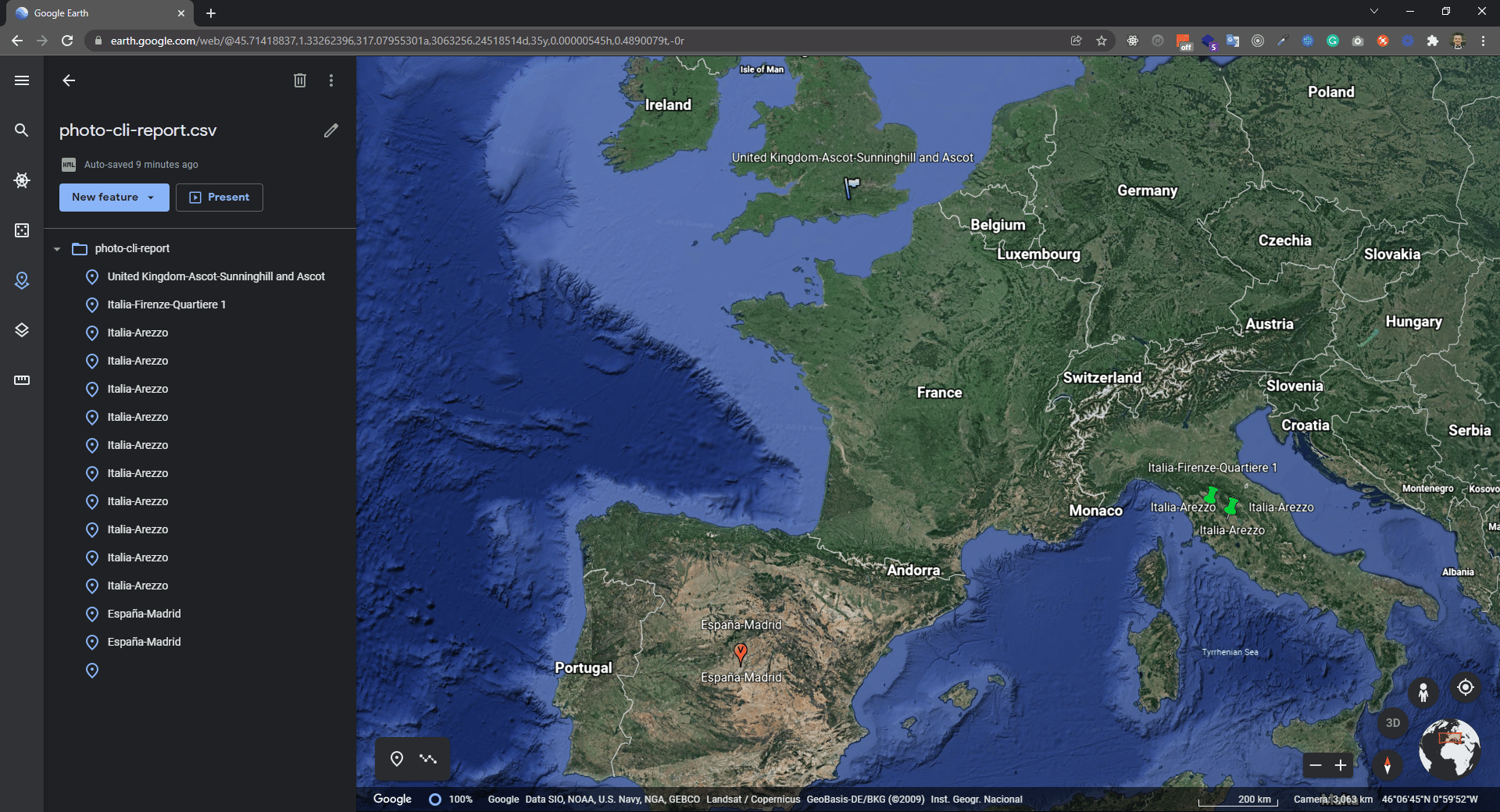
 ### Google Earth Web
[Earth Web](https://earth.google.com/web/) doesn't import CSV directly — first export a KML/KMZ from Earth Desktop, then create a project and add the KML file to it.
### Google Earth Web
[Earth Web](https://earth.google.com/web/) doesn't import CSV directly — first export a KML/KMZ from Earth Desktop, then create a project and add the KML file to it.
 ## Core commands
Archive photos with SHA1-based deduplication and index into a local SQLite database.
Copy photos into a new organized folder with custom naming and folder strategies.
Export photo metadata (date, coordinates, address) to a CSV file.
Browse, filter, and open archived photos by album, date, or date range.
Preview the reverse geocode response for a single photo.
Run an MCP server to let AI assistants query your photo archive.
## Core commands
Archive photos with SHA1-based deduplication and index into a local SQLite database.
Copy photos into a new organized folder with custom naming and folder strategies.
Export photo metadata (date, coordinates, address) to a CSV file.
Browse, filter, and open archived photos by album, date, or date range.
Preview the reverse geocode response for a single photo.
Run an MCP server to let AI assistants query your photo archive.